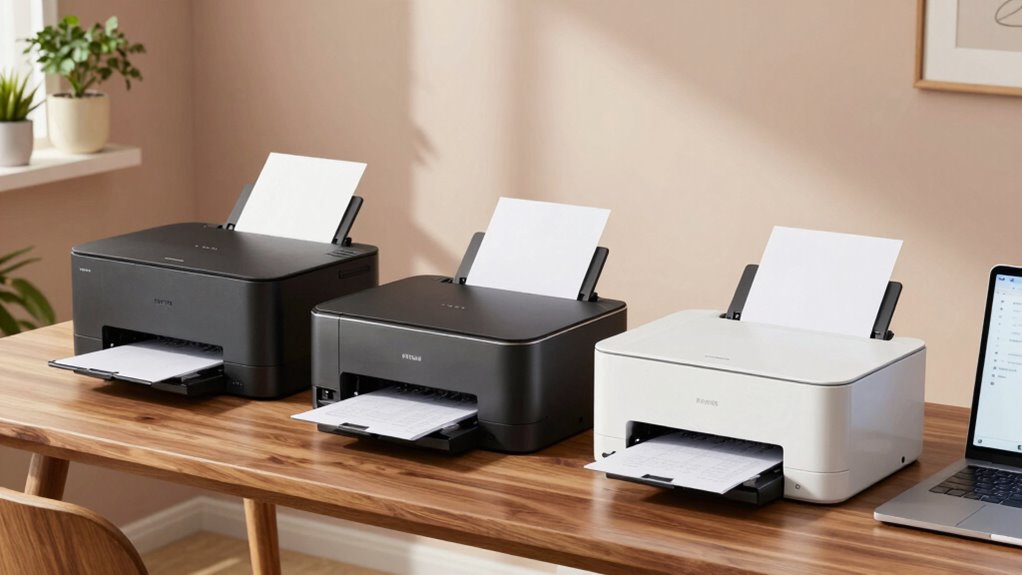
Choosing the right wireless laser printer for a home office can be challenging with so many options that vary in speed, features, and price. The Brother HL-L2405W stands out for its affordability and mobile printing, while the HP LaserJet M110w offers a compact design ideal for small spaces. For those needing a versatile all-in-one, the HP LaserJet Pro MFP 3101sdw provides scanning and copying. The Brother HL-L2460DW balances speed and efficiency with automatic duplex printing, whereas the Brother DCP-L2640DW combines multiple functions for small teams. Each has tradeoffs, from limited color options to higher ongoing costs, so understanding your priorities is key.

Get business pricing on office and shipping supplies
- Business-only prices and quantity discounts
- Tax-exempt purchasing
- Multiple users, one account, clear invoices
Key Takeaways
- Speed and volume capacity vary significantly; higher ppm models are better for frequent printing.
- All-in-one models add scanning and copying but may require more expensive cartridges.
- Compact size often means lower paper capacity but better space management for home offices.
- Wireless connectivity ease differs, with some models offering Ethernet and USB as well.
- Cost of ongoing toner replacement and subscription services can impact long-term value.
| Brother HL-L2405W Wireless Monochrome Laser Printer with Mobile Printing |  | Best Overall for Simplicity and Mobile Printing | Print Speed: 30 pages per minute | Connectivity: Wi-Fi (dual-band), USB | Paper Capacity: 250 sheets | VIEW ON AMAZON | See Our Full Breakdown |
| HP LaserJet M110w Wireless Black & White Printer |  | Best for Small Spaces and Simplicity | Printer Type: Laser | Print Speed: Up to 21 ppm | Maximum Media Size: 8.5 x 14 inches | VIEW ON AMAZON | See Our Full Breakdown |
| HP LaserJet Pro MFP 3101sdw Wireless Black and White All-in-One Laser Printer |  | Best for Small Teams Needing Multifunction Capabilities | Print Speed: Up to 35 ppm | Functions: Print, Scan, Copy | Auto Duplex: Yes | VIEW ON AMAZON | See Our Full Breakdown |
| Brother HL-L2460DW Wireless Monochrome Laser Printer with Duplex and Mobile Printing |  | Best for Speed and Efficiency in Small Offices | Print Speed: 36 ppm | Connectivity: Wireless, Ethernet, USB | Paper Capacity: 250 sheets | VIEW ON AMAZON | See Our Full Breakdown |
| Brother DCP-L2640DW Wireless Monochrome Multi-Function Printer |  | Best for All-in-One Functionality and Space-Saving Design | Print Speed: 36 ppm | Scan Speed: 23.6/7.9 ipm | Auto Document Feeder: 50 pages | VIEW ON AMAZON | See Our Full Breakdown |
| wireless laser printers for home office | Print Speed | Connectivity |
|---|---|---|
| Brother HL-L2405W Wireless Mon | 30 pages per minute | Wi-Fi (dual-band), USB |
| HP LaserJet M110w Wireless Bla | Up to 21 ppm | USB, Wireless |
| HP LaserJet Pro MFP 3101sdw Wi | Up to 35 ppm | Wireless |
| Brother HL-L2460DW Wireless Mo | 36 ppm | Wireless, Ethernet, USB |
| Brother DCP-L2640DW Wireless M | 36 ppm | Wireless, Ethernet, USB |
More Details on Our Top Picks
Brother HL-L2405W Wireless Monochrome Laser Printer with Mobile Printing
This pick stands out for its straightforward, space-saving design and reliable wireless connectivity. It offers a respectable printing speed of 30 pages per minute and a large 250-sheet tray that reduces refill frequency, ideal for small home offices with moderate volume. While it’s limited to black and white output and lacks duplex printing, its support for mobile printing and free toner subscription trial make it a solid all-around choice. Compared to multifunction models, it’s simpler but might require separate scanners or copiers if needed.
Pros:- Fast printing speed of 30ppm
- Large 250-sheet paper capacity
- Wireless and mobile printing support
- Includes a free toner subscription trial
Cons:- Limited to black and white printing
- No duplex printing
- Toner replacement necessary for ongoing use
Best for: Buyers seeking a reliable monochrome printer with mobile print capability and high-volume capacity
Not ideal for: Those needing color printing or multifunction features like scanning or copying
- Print Speed:30 pages per minute
- Connectivity:Wi-Fi (dual-band), USB
- Paper Capacity:250 sheets
- Printer Type:Monochrome Laser
- Supported Toner:Brother Genuine TN830/TN830XL
- Warranty:1 year
Our verdict“A dependable, straightforward monochrome printer perfect for home offices prioritizing speed and capacity over multifunctionality.”
HP LaserJet M110w Wireless Black & White Printer
The HP LaserJet M110w makes an excellent choice for those with tight spaces and straightforward printing needs. Its compact size, weighing only 9 pounds, allows it to fit comfortably on small desks or shelves. With a print speed of up to 21 pages per minute, it offers fast enough performance for light to moderate use. The setup is simple, and its mobile printing app ensures seamless connectivity. However, it’s limited to black and white output and has a modest 150-sheet capacity, which could be restrictive for busy households or small teams that print frequently in volume.
Pros:- Compact size fits small spaces
- Fast print speeds for its class
- Wireless and mobile printing capabilities
- Easy setup and reliable connectivity
Cons:- Limited to black & white printing
- Maximum paper capacity of 150 sheets
- Requires original HP cartridges for best results
Best for: Individuals or small households needing a space-efficient, reliable monochrome printer
Not ideal for: Users requiring color printing or higher volume throughput
- Printer Type:Laser
- Print Speed:Up to 21 ppm
- Maximum Media Size:8.5 x 14 inches
- Maximum Sheet Capacity:150 sheets
- Connectivity:USB, Wireless
- Weight:9 pounds
Our verdict“A compact, reliable monochrome printer suited for small spaces with moderate printing needs.”
HP LaserJet Pro MFP 3101sdw Wireless Black and White All-in-One Laser Printer
This all-in-one model excels for small teams needing printing, scanning, and copying in one device. Its 35 ppm speed is impressive for a compact unit, and the 250-sheet input tray supports higher volume tasks without frequent refills. Automatic duplex printing helps save paper, and the wireless setup is straightforward. The main tradeoff is the higher price point and the limited color capabilities—it’s strictly monochrome. Additionally, some cartridges require specific HP chips, which could restrict third-party options.
Pros:- Fast print speeds up to 35 ppm
- Automatic duplex printing
- Supports scanning and copying
- Reliable wireless connectivity
Cons:- Limited to black and white
- Higher purchase price
- Cartridge restrictions due to chip requirements
Best for: Small teams or home offices needing multifunctional capabilities in a compact device
Not ideal for: Those who require color printing or a lower-cost, single-function printer
- Print Speed:Up to 35 ppm
- Functions:Print, Scan, Copy
- Auto Duplex:Yes
- Input Tray Capacity:250 sheets
- Connectivity:Wireless
- Auto Document Feeder:50 sheets
Our verdict“A versatile all-in-one printer that balances speed and functionality for small team environments.”
Brother HL-L2460DW Wireless Monochrome Laser Printer with Duplex and Mobile Printing
This model is a strong contender for those who prioritize fast printing and cost efficiency. Its 36 ppm speed exceeds many competitors, and the 250-sheet tray minimizes refills during high-volume tasks. It supports automatic duplex printing, reducing paper waste, and offers both Wi-Fi and Ethernet for flexible connectivity. The device is monochrome only, which suits most home office needs but might be limiting for those who occasionally need color. The subscription requirement for toner savings adds ongoing costs to consider.
Pros:- Fast printing at 36 ppm
- Automatic duplex printing
- Large 250-sheet paper tray
- Wi-Fi and Ethernet connectivity
Cons:- Monochrome only
- Requires subscription for toner savings
- No built-in scanning or copying
Best for: Home offices and small teams that need fast, high-volume monochrome printing
Not ideal for: Users needing color output or multifunctional features
- Print Speed:36 ppm
- Connectivity:Wireless, Ethernet, USB
- Paper Capacity:250 sheets
- Energy Star:Yes
- Compatible Toner:TN830, TN830XL
Our verdict“A speed-focused monochrome printer ideal for high-volume, cost-conscious home office environments.”
Brother DCP-L2640DW Wireless Monochrome Multi-Function Printer
This multifunction printer combines printing, scanning, and copying, making it suitable for small offices that need multiple functions in one device. Its 36 ppm speed and 50-page auto document feeder streamline workflows, while wireless, Ethernet, and USB connections offer flexible setup options. The device is monochrome only, which limits color needs, and it requires compatible toner cartridges for optimal operation. Its compact footprint helps save space, but the lack of automatic duplex printing is a drawback for some users.
Pros:- Fast print and scan speeds
- Multi-function capabilities (print, scan, copy)
- Multiple connectivity options
- Compact design suitable for small spaces
Cons:- Limited to monochrome
- No automatic duplex printing
- Dependent on compatible toner cartridges
Best for: Small offices needing a space-efficient, all-in-one monochrome device
Not ideal for: Those needing color printing or automatic duplexing
- Print Speed:36 ppm
- Scan Speed:23.6/7.9 ipm
- Auto Document Feeder:50 pages
- Connectivity:Wireless, Ethernet, USB
- Compatible Toner:TN830, TN830XL
Our verdict“A versatile, space-saving all-in-one printer perfect for small businesses with monochrome needs.”

How We Picked
Our selections are based on a combination of factors including print speed, connectivity options, paper capacity, versatility, and value for home office use. We prioritized models that balance ease of use with productivity features, focusing on wireless printing reliability and ongoing costs. Each product was evaluated against similar options to highlight differences in intended use cases, so you can match the right device to your specific needs and workspace constraints.
| wireless laser printers for home office | Connectivity |
|---|---|
| Brother HL-L2405W Wireless Mon | Wi-Fi (dual-band), USB |
| HP LaserJet M110w Wireless Bla | USB, Wireless |
| HP LaserJet Pro MFP 3101sdw Wi | Wireless |
| Brother HL-L2460DW Wireless Mo | Wireless, Ethernet, USB |
| Brother DCP-L2640DW Wireless M | Wireless, Ethernet, USB |
Factors to Consider When Choosing Wireless Laser Printers For Home Office
When choosing a wireless laser printer for your home office, focus on your specific needs—whether it’s volume, multifunctionality, or space constraints. Speed and paper capacity matter if you print frequently, while multifunction features are essential if you need to scan or copy regularly. Cost considerations also include ongoing toner expenses and connectivity options. Here’s what to consider for each type of user.
Speed and Volume
If you print high volumes often, models like the Brother HL-L2460DW or DCP-L2640DW offer speeds of 36 ppm and large paper trays, reducing refills. For light use, the HP LaserJet M110w provides adequate speed in a compact form factor, but may struggle with larger jobs due to its 150-sheet capacity.
Multifunctionality
For those who need scanning and copying, the HP LaserJet Pro MFP 3101sdw and Brother DCP-L2640DW deliver all-in-one features. Keep in mind, these models tend to be more expensive, and some require specific cartridges. If you only need printing, simpler monochrome models like the Brother HL-L2405W or HP LaserJet M110w might be better suited.
Space and Connectivity
Small spaces benefit from compact designs like the HP LaserJet M110w. Wireless connectivity is standard in all models reviewed, but some, like the Brother HL-L2460DW, also offer Ethernet, which can be useful for wired networks. Ensure your device supports mobile printing if that’s a priority for your workflow.
Cost of Ongoing Supplies
Monochrome laser printers tend to have lower per-page costs, but toner replacement and subscription services can add up. The Brother models often include toner subscription trials, which can reduce ongoing costs, while some HP models require specific cartridges that might be pricier over time.
Frequently Asked Questions
Do all wireless laser printers support mobile printing?
Most modern wireless laser printers, including those in this lineup, support mobile printing through dedicated apps or standard protocols like Apple AirPrint and Google Cloud Print. Check device specifications to ensure compatibility with your smartphone or tablet before purchasing.
Is automatic duplex printing standard in home office laser printers?
Automatic duplex printing is common in higher-end models like the Brother HL-L2460DW and HP LaserJet Pro 3101sdw, but not in entry-level or compact models like the HP LaserJet M110w. If saving paper is a priority, choose a model with this feature.
Are monochrome laser printers suitable for color documents?
No, monochrome laser printers only produce black-and-white output. If you need color printing, you’ll need to look at different models that support color, which typically cost more and have different maintenance requirements.
How important is paper capacity in a home office printer?
Paper capacity impacts how often you need to refill the tray. If you print frequently, a larger tray like 250 sheets can save time. For occasional printing, smaller capacities like 150 sheets may suffice, but you’ll need to refill more often.
What ongoing costs should I expect with laser printers?
Ongoing costs mainly involve toner cartridges, which vary in price depending on the model. Subscription services can help reduce costs, but they also add to your monthly expenses. Consider the toner yield and replacement costs when choosing a model to avoid surprises.
Conclusion
If you need a simple, reliable monochrome printer for light to moderate use, the Brother HL-L2405W offers great value and mobile printing. Small space users or those prioritizing compactness should consider the HP LaserJet M110w, though it’s limited in volume capacity. For small teams requiring all-in-one functionality, the HP LaserJet Pro MFP 3101sdw provides versatility at a higher price. Speed-focused users will appreciate the Brother HL-L2460DW’s high ppm and duplex features. Meanwhile, the Brother DCP-L2640DW balances multi-functionality with space efficiency, ideal for small offices with diverse needs. Your choice depends on your volume, space, and whether multifunctionality or cost savings are your priorities.
Fall Picks
fall essentials
As an affiliate, we earn on qualifying purchases.