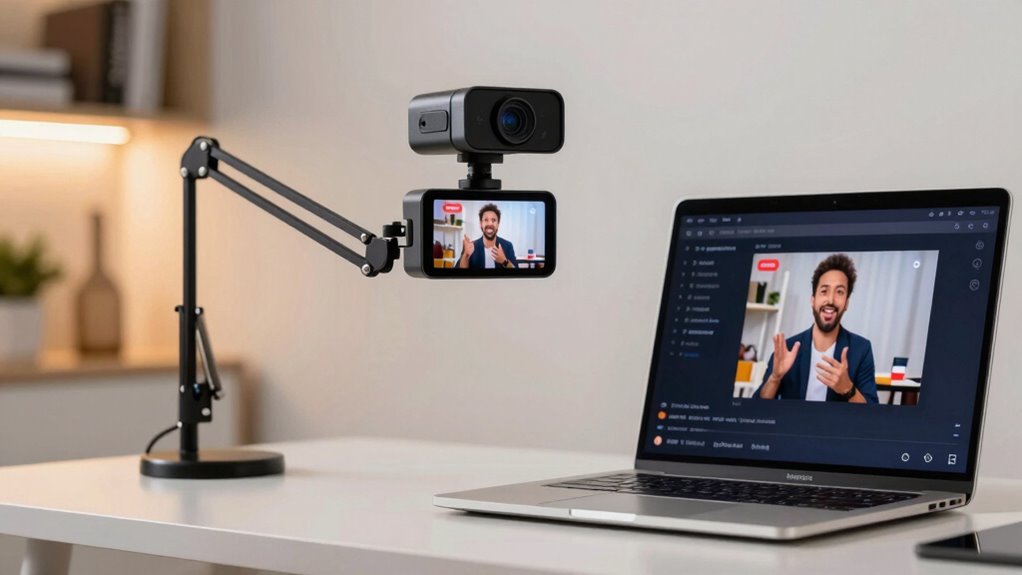

For most Facebook Live sellers, I’d start with the Logitech StreamCam: its Full HD video and seller-friendly streaming design suit a fixed desk setup without the complexity of a production system. The EMEET C950 is a strong alternative if you want 4K autofocus, while the Tenveo 4K PTZ bundle is built for larger spaces and camera movement. The main tradeoff is between a simple camera that is easy to set up and a more capable system that needs extra space, setup, or control. I compare all 12 options by image, framing, audio, ease of use, and fit for live selling. Read on for the full breakdown and a pick matched to your selling setup.

Get business pricing on office and shipping supplies
- Business-only prices and quantity discounts
- Tax-exempt purchasing
- Multiple users, one account, clear invoices
Key Takeaways
- The StreamCam is the most balanced desk-streaming choice: it is a more focused fit for regular live sessions than basic meeting webcams, without the multi-device setup of the amazon.com/dp/B0H3KSFM4C?tag=directsaleshelp.com-20&ascsubtag=dc-347890″ target=”_blank” rel=”nofollow sponsored noopener”>Tenveo bundle.
- 4K alone does not make a camera better for selling: autofocus, usable framing, lighting, and the camera’s position can matter more than extra resolution in a typical home setup.
- PTZ systems solve a different problem: the Tenveo and MT-VIKI models make more sense when a seller moves around or needs automated framing, but add setup and control complexity.
- Built-in lights and microphones are convenience features, not full studio replacements: the Angetube and several USB webcams can simplify a starter setup, while separate lighting and audio may give more control.
- Simple USB models remain relevant: the Logitech Brio 101, Amazon Basics, Wegear, and EMEET C960 suit straightforward desk streams, but differ in field of view, microphones, and available framing flexibility.
| Wegear 1080p Webcam for PC – Full HD Computer Camera with Dual Mics, USB‑A |  | Best for a Simple Seller Desk | Video resolution: 1080p at 30 fps | Sensor: 2.0 MP CMOS, 1/3-inch | Connection: USB-A | VIEW ON AMAZON | See Our Full Breakdown |
| Tenveo 4K 20X NDI PTZ Camera with AI Auto-Tracking Bundle (3 pcs) with Joystick Controller and 8-Port PoE Switch |  | Best for Multi-Angle Live Production | Bundle: Three 4K NDI PTZ cameras, controller, and 8-port gigabit PoE switch | Sensor: 8.29 MP, 1/2.8-inch CMOS | Optical zoom: 20X | VIEW ON AMAZON | See Our Full Breakdown |
| Logitech Brio 101 Full HD 1080p Webcam for Streaming and Meetings – Black |  | Best for Beginners | Video resolution: 1080p Full HD | Lighting feature: RightLight boost up to 50% | Connection: USB-A | VIEW ON AMAZON | See Our Full Breakdown |
| Amazon Basics Webcam with Microphone, Full HD 1080p, Auto Light Correction, Computer Camera for Streaming and Meetings, Black |  | Best for a Portable Basic Setup | Resolution: Full HD 1080p | Light correction: Automatic | Microphone: Built-in | VIEW ON AMAZON | See Our Full Breakdown |
| EMEET C960 1080P Webcam with Microphone, 2 Mics, 90° FOV, Computer Camera |  | Best for Showing Products on a Wide Table | Resolution: 1920 × 1080p | Field of view: 90° | Microphones: Two omnidirectional microphones | VIEW ON AMAZON | See Our Full Breakdown |
| MT-VIKI 4K AI PTZ Webcam with Auto Tracking and Gesture Control |  | Best for Hands-Free Product Demonstrations | Resolution and frame rate: 4K at 30 fps; 1080p at 60 fps | Lens field of view: 92° | Pan and tilt: 330° pan; 180° tilt | VIEW ON AMAZON | See Our Full Breakdown |
| Angetube Streaming Webcam with Microphone, USB 1080P Web Cam with Ring Light |  | Best for Sellers Without Separate Lighting | Resolution: 1080p | Frame rate: Up to 60 fps | Lighting: Multi-color ring light with adjustable brightness | VIEW ON AMAZON | See Our Full Breakdown |
| HDMI 4K USB Camera for Live Streaming and Video Conferencing | 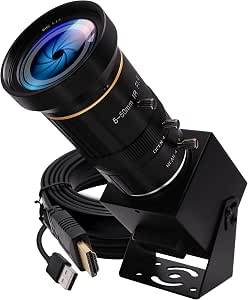 | Best for Controlled Product Close-Ups | USB resolution and frame rate: 3840×2160 at 30 fps | Optical zoom: 10X | Digital zoom: 2X | VIEW ON AMAZON | See Our Full Breakdown |
| Logitech StreamCam Premium Webcam – Graphite |  | Best for Smooth, Movement-Friendly Full HD | Resolution and frame rate: 1080p at 60 fps | Focus: Smart autofocus | Framing and exposure: Auto-framing and intelligent exposure | VIEW ON AMAZON | See Our Full Breakdown |
| EMEET C950 4K Webcam with PDAF Autofocus and Microphone |  | Best for Simple 4K Desk Setups | Resolution and frame rate: 4K at 30 fps; 1080p at 60 fps | Field of view: 70° | Autofocus: PDAF | VIEW ON AMAZON | See Our Full Breakdown |
| EMEET Piko 4K Webcam for Streaming, Dual-Camera AI-Powered |  | Best for Low-Light Live Selling | Resolution: 4K | Camera type: Dual-camera AI-powered | Sensor: 1/2.8 inch | VIEW ON AMAZON | See Our Full Breakdown |
| NexiGo N660P Pro 4K Webcam with Distortion-Free Lens, Autofocus, 1080p 60 fps, Noise-Canceling Mics & Privacy Cover – White |  | Best for Natural-Looking Product Demos | Video resolution: 4K | Shooting modes: 4K at 30 fps; 1080p at 60 fps | Lens: Distortion-free | VIEW ON AMAZON | See Our Full Breakdown |
| webcams for facebook live seller | Focus | Connectivity |
|---|---|---|
| Wegear 1080p Webcam for PC | Fixed focus | — |
| Tenveo 4K 20X NDI PTZ Camera w | — | — |
| Logitech Brio 101 Full HD 1080 | — | — |
| Amazon Basics Webcam with Micr | — | — |
| EMEET C960 1080P Webcam with M | Fixed focus | — |
| MT-VIKI 4K AI PTZ Webcam with | TOF fast focus, 0.2 seconds | USB-C |
| Angetube Streaming Webcam with | Autofocus | USB-A and USB-C adapter |
| HDMI 4K USB Camera for Live St | — | — |
| Logitech StreamCam Premium Web | Smart autofocus | USB-C |
| EMEET C950 4K Webcam with PDAF | — | USB |
| EMEET Piko 4K Webcam for Strea | — | USB-C to USB-C and USB-C to USB-A |
| NexiGo N660P Pro 4K Webcam wit | Autofocus | USB plug-and-play |
More Details on Our Top Picks
Wegear 1080p Webcam for PC – Full HD Computer Camera with Dual Mics, USB‑A
For a Facebook Live seller who mainly presents products from one fixed spot, the Wegear C100 keeps the setup straightforward: it captures 1080p at 30 fps, connects over USB-A, and includes dual microphones and a sliding privacy cover. Its automatic light balance can help when room lighting varies, though it is not a substitute for dedicated lighting on products that need accurate color. Compared with the EMEET C960, Wegear has a narrower 85° field of view, which can make a single-person shot feel less open but may keep more of a cluttered sales area out of frame. The main limitation is fixed focus: sellers moving products close to the camera may not get the sharp detail they want. It also lacks USB-C and adjustable framing.
Pros:- Full HD 1080p video at 30 fps
- Dual built-in microphones and a sliding privacy cover
- Five-foot integrated USB-A cable for a direct plug-in setup
- Compatible with Windows, macOS, and ChromeOS
Cons:- Fixed focus can leave close-up product demonstrations soft
- Fixed 85° field of view offers no framing adjustment
- USB-A connection may need an adapter for newer USB-C-only devices
Best for: Facebook Live sellers who sit at a fixed desk, want a basic USB-A setup, and mostly show products at arm’s length.
Not ideal for: Sellers who frequently hold small items close to the lens, need adjustable framing, or rely on a USB-C-only computer.
- Video resolution:1080p at 30 fps
- Sensor:2.0 MP CMOS, 1/3-inch
- Connection:USB-A
- Focus:Fixed focus
- Field of view:85°
- Microphones:Dual built-in microphones
- Cable:5-foot integrated USB-A cable
- Compatibility:Windows, macOS, and ChromeOS
Our verdict“Choose the Wegear for a simple, fixed-position seller setup, but skip it if close-up detail or adjustable framing is a priority.”
Tenveo 4K 20X NDI PTZ Camera with AI Auto-Tracking Bundle (3 pcs) with Joystick Controller and 8-Port PoE Switch
The Tenveo three-camera bundle suits sellers whose Facebook Live shows resemble a small studio production: multiple product angles, presenter tracking, and a dedicated controller can support more elaborate switching than a single desktop webcam. Its 20X optical zoom is useful for framing distant displays or close detail without relying on digital enlargement, while the included PoE switch reduces the need for separate power runs. Compared with the plug-and-play Logitech Brio 101, this setup offers far more camera control but demands network planning, configuration, and a compatible production workflow. It is a poor match for casual one-person selling: the bundle has no built-in microphone, and its network protocols and control hardware add setup work. Sellers should also check that their Facebook Live streaming path supports the chosen output method before buying.
Pros:- Three cameras support multiple product and presenter angles
- 20X optical zoom helps frame distant or detailed subjects
- AI human and face tracking can keep a moving presenter in frame
- Bundle includes a 7-inch LCD quad-screen controller and an 8-port PoE switch
Cons:- No built-in microphone; separate audio equipment is needed
- Network, controller, and streaming configuration can be demanding
- More equipment and setup than a typical seller desk requires
Best for: Established sellers producing multi-camera product demonstrations who have space, technical support, and a compatible streaming workflow.
Not ideal for: Solo sellers starting with a laptop and one camera, or anyone who wants an integrated microphone and quick plug-and-play setup.
- Bundle:Three 4K NDI PTZ cameras, controller, and 8-port gigabit PoE switch
- Sensor:8.29 MP, 1/2.8-inch CMOS
- Optical zoom:20X
- Video outputs:HDMI 4K, USB 3.0 4K, 3G-SDI 1080p, and IP/NDI 1080p
- Interfaces:SDI, HDMI, USB 3.0, and LAN with PoE
- Control:7-inch LCD quad-screen and 4D joystick
- Network protocols:RTSP, RTMP, ONVIF, VISCA over IP, and NDI
- Audio connections:Line input and line output
Our verdict“Pick the Tenveo only if your live sales need multiple controlled camera angles and you can manage a more involved production setup.”
Logitech Brio 101 Full HD 1080p Webcam for Streaming and Meetings – Black
The Logitech Brio 101 is a sensible first webcam for sellers who want a familiar, uncomplicated way to appear on Facebook Live. Its 1080p video, built-in microphone, and sliding cover handle the basics, while RightLight boost can brighten a dimmer scene. That can help a seller’s face read clearly on camera, though product color and fine surface detail still depend on the room lighting. Compared with the Wegear C100, Brio 101 highlights brightness and shadow reduction rather than dual microphones; it is also built with 77% post-consumer recycled plastic. The tradeoff is a limited feature set: there is no listed autofocus or advanced framing control, and its USB-A connection may call for an adapter on newer devices. It fits a steady, face-to-camera selling style better than frequent close-up product work.
Pros:- Full HD 1080p video for clear on-camera presentation
- RightLight boost helps brighten the image and reduce shadows
- Sliding privacy cover for use between live sessions
- Made with 77% post-consumer recycled plastic
Cons:- USB-A connection, with no listed USB-C option
- Basic feature set offers limited control for changing product framing
- Built-in microphone is a single mic rather than the dual-mic setup listed for the Wegear C100
Best for: New Facebook Live sellers who want a straightforward webcam for a fixed desk, basic product presentation, and face-to-camera hosting.
Not ideal for: Sellers who need autofocus or advanced framing, or who connect through a USB-C-only computer without an adapter.
- Video resolution:1080p Full HD
- Lighting feature:RightLight boost up to 50%
- Connection:USB-A
- Microphone:Built-in microphone
- Privacy:Sliding webcam cover
- Materials:77% post-consumer recycled plastic
- Compatibility:Windows, Mac, and Nintendo Switch
Our verdict“Choose the Brio 101 if you want a simple, recognizable starter webcam for a stationary selling setup rather than detailed close-up demonstrations.”
Amazon Basics Webcam with Microphone, Full HD 1080p, Auto Light Correction, Computer Camera for Streaming and Meetings, Black
For sellers who stream from different desks or travel between selling locations, the Amazon Basics webcam prioritizes a compact, lightweight form over production controls. Its 1080p video, automatic light correction, and built-in microphone cover core needs for a simple Facebook Live presentation, and its listed weight of 103.5 g makes it easy to pack. Unlike the wider-view EMEET C960, the supplied product details do not list a field of view, dual microphones, or a privacy cover, so I would not choose it for a shot that needs to show a broad tabletop or several people. The available feature information is also sparse, making fit harder to judge before purchase. It makes the most sense when portability and a basic connection matter more than tailored framing or audio options.
Pros:- Full HD 1080p resolution
- Automatic light correction for changing room conditions
- Built-in microphone for basic live audio
- Compact, lightweight design at 103.5 g
Cons:- Product details do not specify field of view or focus type
- No advanced controls are listed for adjusting a sales shot
- The supplied specifications do not list a privacy cover
Best for: Mobile sellers who need a lightweight 1080p webcam for occasional live streams from a laptop or changing work locations.
Not ideal for: Sellers who need a wide view of a display table, documented privacy controls, or more detailed camera and microphone specifications.
- Resolution:Full HD 1080p
- Light correction:Automatic
- Microphone:Built-in
- Color:Black
- Weight:103.5 g
- Use:Streaming and meetings
Our verdict“Choose this model for a lightweight, basic webcam you can move between locations, not for a carefully framed or audio-intensive sales setup.”
EMEET C960 1080P Webcam with Microphone, 2 Mics, 90° FOV, Computer Camera
The EMEET C960 is the stronger fit when a Facebook Live shot needs to include both the seller and a spread of products. Its 90° field of view captures more of a tabletop than the listed 85° Wegear C100, and the two omnidirectional microphones can pick up speech without requiring the presenter to stay directly in front of a single mic. Automatic light correction helps with changing room brightness, while the USB-A connection includes an A-to-C adapter. The tradeoff is that this wide view can show more background clutter, and its fixed-focus lens may not keep small items sharp when held close. Compared with the basic Amazon Basics option, the C960 provides clearer documented framing and dual-mic details, but it still lacks built-in speakers and does not support Windows Hello.
Pros:- 90° field of view shows more of a product display than the Wegear C100
- Dual omnidirectional microphones capture presenter audio
- Automatic light correction helps adapt to changing brightness
- USB-A connection includes an A-to-C adapter
Cons:- Fixed focus may soften products held close to the lens
- Wide framing can include unwanted background clutter
- No built-in speakers or Windows Hello support
Best for: Sellers who present several items across a tabletop and want a wider camera view with dual microphones.
Not ideal for: Sellers who need autofocus for close product detail, a tightly cropped background, or Windows Hello facial recognition.
- Resolution:1920 × 1080p
- Field of view:90°
- Microphones:Two omnidirectional microphones
- Focus:Fixed focus
- Connection:USB Type-A with A-to-C adapter
- Lens focal range:50 cm to 3 m
- Lighting:Automatic light correction
- Supported operating systems:Windows 10/11, macOS 10.14+, and Android TV 7.0+
Our verdict“Choose the C960 if your sales demos need a broad tabletop view, but look elsewhere for dependable close-up focus or a tight crop.”
MT-VIKI 4K AI PTZ Webcam with Auto Tracking and Gesture Control
For sellers who move around to show products, the MT-VIKI’s AI tracking and pan-tilt movement can keep the camera following the action without someone adjusting it mid-stream. Its 92° lens and six preset positions also make it easier to switch between a face-to-camera view and a wider display area. Compared with the Logitech StreamCam, which offers smooth 1080p video and auto-framing but no pan-tilt movement, the MT-VIKI gives sellers more control over changing angles. It also records in 4K at 30 fps or 1080p at 60 fps, providing a choice between fine detail and smoother motion. The tradeoff is a more involved feature set with limited information about software customization, and it lacks a built-in lighting feature for dim selling spaces.
Pros:- AI auto-tracking and silent pan-tilt movement can follow sellers as they demonstrate products.
- Offers 4K at 30 fps or 1080p at 60 fps for detail or smoother motion.
- Six preset positions make it easier to return to saved camera angles.
- USB-C connection and broad operating-system compatibility support flexible setups.
Cons:- No built-in light is listed, so sellers may need separate lighting for dim rooms.
- Software customization options are not clearly specified.
- Its tracking and pan-tilt features may be unnecessary for sellers who remain seated.
Best for: Facebook Live sellers who stand, move, or handle products on camera and want automatic camera tracking with preset viewing angles.
Not ideal for: Sellers who stay seated in one position and want a straightforward webcam with a simple setup and built-in light.
- Resolution and frame rate:4K at 30 fps; 1080p at 60 fps
- Lens field of view:92°
- Pan and tilt:330° pan; 180° tilt
- Focus:TOF fast focus, 0.2 seconds
- Microphones:Dual noise-canceling
- Connectivity:USB-C
- Built-in features:AI auto-tracking, gesture control, HDR
- Preset positions:6
Our verdict“Choose the MT-VIKI if your Facebook Live sales depend on moving product demonstrations and hands-free camera tracking.”
Angetube Streaming Webcam with Microphone, USB 1080P Web Cam with Ring Light
The Angetube is the most lighting-focused choice here: its adjustable ring light can brighten a seller’s face and products without adding a separate lamp to the desk. That makes it a practical alternative to the EMEET C950, which offers 4K capture and PDAF autofocus but no built-in light. Angetube also streams at 1080p and 60 fps, and its remote lets sellers adjust the camera from a distance rather than reaching toward the setup during a live session. The privacy shutter is useful between broadcasts. Its main compromise is resolution: it does not offer the 4K detail available from the EMEET C950 or MT-VIKI. The 5X digital zoom is limited to 720p and lower, so it is not a way to get close-ups while keeping full-HD quality.
Pros:- Adjustable ring light helps illuminate the seller without a separate light.
- 1080p at 60 fps supports smooth-looking live video.
- Remote control allows adjustments from away from the computer.
- Privacy shutter provides a physical way to cover the lens.
Cons:- 5X digital zoom is limited to 720p and lower resolutions.
- 1080p capture lacks the fine detail available from the 4K models in this roundup.
- Built-in lighting and remote features may require software adjustments for a seller’s setup.
Best for: Solo sellers broadcasting from a desk or small room who want adjustable on-camera lighting and remote controls in one webcam.
Not ideal for: Sellers whose product demonstrations need sharp 4K close-ups or who rely on zoom while keeping 1080p output.
- Resolution:1080p
- Frame rate:Up to 60 fps
- Lighting:Multi-color ring light with adjustable brightness
- Zoom:5X digital zoom at 720p and lower
- Microphone:Dual omnidirectional with noise cancellation
- Focus:Autofocus
- Connectivity:USB-A and USB-C adapter
- Controls and privacy:RF remote control and privacy shutter
Our verdict“Pick the Angetube if built-in lighting and remote operation matter more to your selling setup than 4K resolution.”
HDMI 4K USB Camera for Live Streaming and Video Conferencing
This camera suits sellers who want to set framing and focus deliberately, especially for detailed demonstrations of small items. Its 10X optical zoom and manual 5–50 mm lens give more control over close-ups than the fixed-view EMEET C950, whose 70° field of view is better suited to a straightforward face-to-camera setup. USB-C and HDMI outputs also offer more connection choices for a seller building a dedicated streaming rig. The tradeoff is that framing is not hands-free: sellers must manually adjust zoom and focus, which can interrupt a live session if products or camera positions change often. The camera has no built-in microphone, and its HDMI output is limited to 1080p even though USB supports 4K at 30 fps.
Pros:- 10X optical zoom supports detailed product close-ups without relying only on digital zoom.
- Manual 5–50 mm lens allows deliberate focus and framing.
- USB-C and HDMI outputs suit varied streaming and recording setups.
- USB video supports 3840×2160 resolution at 30 fps.
Cons:- Manual focus and zoom require adjustments by the seller or a helper.
- No built-in microphone is specified, so separate audio equipment is needed.
- HDMI output is limited to 1080p.
Best for: Product sellers who use a fixed camera position and need manual optical zoom for close-ups of jewelry, collectibles, or other fine details.
Not ideal for: Sellers who need automatic focus and framing, built-in audio, or quick adjustments while presenting on camera.
- USB resolution and frame rate:3840×2160 at 30 fps
- Optical zoom:10X
- Digital zoom:2X
- Lens and focus:Manual focus, 5–50 mm
- Outputs:USB Type-C and HDMI
- HDMI resolution:Up to 1080p
- Video formats:H.264, MJPEG, YUY2
- Compatibility:PC, laptop, Android, Raspberry Pi
Our verdict“Choose this camera for a controlled selling setup where manual optical close-ups matter more than automatic operation.”
Logitech StreamCam Premium Webcam – Graphite
The StreamCam is a strong fit for sellers who want smooth 1080p video at 60 fps and expect to move while presenting. Its smart autofocus, auto-framing, and intelligent exposure can help keep the seller visible as they handle products, without the moving camera mechanism found on the MT-VIKI. That makes it a simpler option for a desk or tripod setup, though it cannot follow someone across a room with pan-tilt movement. The StreamCam also supports portrait and landscape mounting, which can help sellers adapt their framing for different content. Compared with the Angetube, it lacks an integrated ring light and remote control, so lighting and camera adjustments may need separate solutions. It is a 1080p model, not a choice for sellers seeking 4K product detail.
Pros:- 1080p at 60 fps produces smooth video for live presentations.
- Autofocus, auto-framing, and intelligent exposure help maintain a usable view as the seller moves.
- Mounting options support landscape, portrait, desktop, or tripod placement.
- USB-C connection supports a direct, modern computer setup.
Cons:- Resolution tops out at 1080p, unlike the 4K options in this roundup.
- USB-C-only connectivity may require an adapter for older computers.
- No built-in lighting or remote control is listed.
Best for: Sellers who present at a desk, move their hands through the frame, and want automatic framing with smooth Full HD video.
Not ideal for: Sellers who need 4K detail, a built-in ring light, or compatibility with older computers that lack USB-C.
- Resolution and frame rate:1080p at 60 fps
- Focus:Smart autofocus
- Framing and exposure:Auto-framing and intelligent exposure
- Connectivity:USB-C
- Mounting:Landscape, portrait, desktop, or tripod setups
- Lens:Glass lens
- Compatibility:Windows 10 or later; macOS 10.14 or later
- Weight:10.23 ounces
Our verdict“Pick the StreamCam if smooth Full HD, automatic framing, and flexible mounting matter more than 4K or built-in lighting.”
EMEET C950 4K Webcam with PDAF Autofocus and Microphone
The EMEET C950 is the most straightforward route in this group to 4K video with fast PDAF autofocus. Its 70° field of view gives a relatively contained view, which can suit a seller who wants to keep the background out of frame and focus on a face or a small tabletop display. Compared with the MT-VIKI, it does not offer pan-tilt tracking or gesture control; compared with the HDMI 4K USB Camera, it trades manual optical zoom for easier autofocus and a built-in microphone. That simplicity suits fixed desk broadcasts, but limits more elaborate product demos. The listed specs do not support tripod mounting, and the microphone is omnidirectional, so it may pick up room sound. Sellers should also check their operating system compatibility before buying.
Pros:- 4K at 30 fps captures more detail than the 1080p-only StreamCam.
- PDAF autofocus is designed to focus quickly as the seller or product moves.
- Built-in omnidirectional microphone supports a simple USB setup.
- Physical privacy cover provides a convenient way to block the camera.
Cons:- No tripod mounting is supported according to the supplied product details.
- The 70° field of view and lack of listed zoom limit flexible product framing.
- Chrome OS compatibility may be incomplete.
Best for: Sellers who stream from a fixed desk and want a compact 4K webcam with autofocus, a built-in microphone, and a physical privacy cover.
Not ideal for: Sellers who need tripod mounting, wide-room coverage, manual optical zoom, or confirmed Chrome OS compatibility.
- Resolution and frame rate:4K at 30 fps; 1080p at 60 fps
- Field of view:70°
- Autofocus:PDAF
- Microphone:Omnidirectional, listed range of 6 feet
- Connectivity:USB
- Privacy:Physical privacy cover
- Operating systems:Windows 10/11, macOS 10.14 or later, Android TV 7.0 or later
- Weight and dimensions:3.04 ounces; 1.9 × 1.9 × 1.5 inches
Our verdict“Choose the C950 for a compact, fixed-position 4K selling setup when autofocus and a built-in mic matter more than zoom or pan-tilt control.”
EMEET Piko 4K Webcam for Streaming, Dual-Camera AI-Powered
The EMEET Piko suits sellers who want detailed product close-ups and a flexible built-in audio setup without stepping up to a separate PTZ camera like the Tenveo 4K 20X NDI bundle. Its 4K dual-camera AI system and 1/2.8-inch sensor are intended to support autofocus and low-light performance, useful when a home workspace has uneven lighting or a seller needs to show small item details. Three microphones and selectable sound modes give more control over voice capture than a basic webcam setup. The tradeoff is that the feature set may be more than a simple, fixed-camera selling station needs, and the remote control requires an optional accessory. I’d choose it over the EMEET C950 when the dual-camera AI approach and audio modes matter more than a straightforward 4K webcam.
Pros:- 4K resolution can show fine product details more clearly than the 1080p Logitech Brio 101.
- Dual-camera AI technology is designed to support rapid autofocus and low-light performance.
- Three microphones and noise-canceling, original-sound, and live sound modes offer audio choices.
- USB-C to USB-C and USB-C to USB-A connectivity supports different computer ports.
Cons:- Remote control requires an optional accessory.
- The dual-camera AI and multiple sound modes may add complexity for sellers who only need a stationary camera.
- Compatibility is listed for Windows and macOS, with no other operating systems specified.
Best for: Facebook Live sellers who stream in a home workspace with variable lighting and want 4K detail plus built-in microphone modes.
Not ideal for: Sellers who want remote control included or need a basic, fixed-position webcam without extra AI and audio features.
- Resolution:4K
- Camera type:Dual-camera AI-powered
- Sensor:1/2.8 inch
- Microphones:3-microphone array
- Sound modes:Noise Canceling, Original Sound, Live Mode
- Connectivity:USB-C to USB-C and USB-C to USB-A
- Compatibility:Windows and macOS
Our verdict“Choose the Piko if low-light performance, 4K product detail, and configurable microphone modes matter more than an included remote.”
NexiGo N660P Pro 4K Webcam with Distortion-Free Lens, Autofocus, 1080p 60 fps, Noise-Canceling Mics & Privacy Cover – White
The NexiGo N660P Pro is a good fit for sellers who want products and their own face to look natural in the same frame: its distortion-free lens avoids the exaggerated edges that can make a close-up demo look odd. It records in 4K at 30 fps or 1080p at 60 fps, giving sellers a choice between fine detail and smoother motion when handling items. Compared with the EMEET Piko, the NexiGo’s appeal is its stated lens design, privacy cover, and flexible mounting rather than a three-microphone array or dual-camera AI. Dual noise-canceling microphones and USB plug-and-play setup keep it practical for a desk-based stream. Its 8-ounce weight may challenge lightweight mounts, and Switch 2 use requires a separate adapter.
Pros:- Distortion-free lens is suited to natural-looking faces and product edges in live demos.
- Offers 4K at 30 fps or 1080p at 60 fps for choosing detail or smoother movement.
- Dual noise-canceling microphones and 3D noise reduction support clear video and voice capture.
- Sliding privacy cover, 360-degree swivel mount, and tripod thread add practical setup flexibility.
Cons:- At 8 ounces, it may be too heavy for some lightweight mounts.
- Switch 2 compatibility requires a separate USB-C to USB-A adapter.
- Not water resistant, so it is not suited to humid or outdoor selling setups.
Best for: Desk-based Facebook Live sellers who demonstrate products close to the camera and want natural-looking framing, autofocus, and a physical privacy cover.
Not ideal for: Sellers using lightweight mounts, streaming outdoors or in humid conditions, or relying on Switch 2 without a separate adapter.
- Video resolution:4K
- Shooting modes:4K at 30 fps; 1080p at 60 fps
- Lens:Distortion-free
- Focus:Autofocus
- Noise reduction:3D noise reduction
- Microphones:Dual noise-canceling microphones
- Connectivity:USB plug-and-play
- Mounting:360-degree swivel mount and tripod thread
- Weight:8 ounces
Our verdict“Pick the N660P Pro if natural-looking close-up demos and flexible frame-rate options matter more than a lighter camera or built-in AI features.”

How We Picked
I ranked these webcams around the needs of a Facebook Live seller: showing products clearly, keeping the host in frame, and getting a dependable picture without making each session difficult to start. I weighed resolution and focus alongside field of view, low-light support, microphones, mounting and connection needs, and practical controls such as privacy covers or tracking. A feature mattered most when it could improve a real selling task, such as keeping a presenter centered while they demonstrate an item.
The order favors cameras that balance image quality, usability, and a realistic seller setup. A simpler USB webcam can outrank a higher-spec model when it is easier to place and operate for a stationary host; PTZ systems earn a place for sellers who need movement or broader coverage, but their added equipment and setup narrow their audience. Product names and listed features are used to distinguish the options, not to imply hands-on testing. I also treat software, computer compatibility, and lighting conditions as part of the buying decision, since camera specifications alone do not determine a live stream’s result.
| webcams for facebook live seller | Focus | Connectivity |
|---|---|---|
| Wegear 1080p Webcam for PC | Fixed focus | — |
| Tenveo 4K 20X NDI PTZ Camera w | — | — |
| Logitech Brio 101 Full HD 1080 | — | — |
| Amazon Basics Webcam with Micr | — | — |
| EMEET C960 1080P Webcam with M | Fixed focus | — |
| MT-VIKI 4K AI PTZ Webcam with | TOF fast focus, 0.2 seconds | USB-C |
| Angetube Streaming Webcam with | Autofocus | USB-A and USB-C adapter |
| HDMI 4K USB Camera for Live St | — | — |
| Logitech StreamCam Premium Web | Smart autofocus | USB-C |
| EMEET C950 4K Webcam with PDAF | — | USB |
| EMEET Piko 4K Webcam for Strea | — | USB-C to USB-C and USB-C to USB-A |
| NexiGo N660P Pro 4K Webcam wit | Autofocus | USB plug-and-play |
Factors to Consider When Choosing Webcams For Facebook Live Sellers
For live selling, the right webcam is the one that fits the way you present products—not simply the one with the highest resolution. I’d plan the camera around your room, host movement, stream length, and how much equipment you want to manage before choosing a model.
Choose Resolution for Your Actual Stream Setup
Resolution is useful only when the rest of the setup can support it. A 4K camera can capture more detail, but your live platform, computer, connection, and stream settings may not deliver a 4K broadcast to viewers. For many sellers, clear Full HD video is a practical target, with good focus and light doing more for product visibility than a larger resolution number. Higher resolution can still help if you crop the image or want more room to reframe, but check how the camera behaves at the resolution and frame rate you plan to use. Avoid paying for 4K solely because it sounds future-proof if your workflow will stream at 1080p and you do not need cropping flexibility.
Match the Field of View to Your Demonstration
A wide view can show a table, display, or more than one person, but it can also make the host and products look smaller. A tighter view gives product demonstrations more prominence, though it may cut off hand movements or items held near the edges. Before buying, mark where the camera will sit and check how much of the selling area must appear in frame. Sellers who stay at a desk can often use a fixed view; those who change position may benefit from a camera that can pan, tilt, or track. A common mistake is choosing a wide lens for flexibility without checking whether the image will still make small product details easy to see.
Plan Lighting Before Relying on Auto Correction
Auto light correction can help with changing exposure, but it cannot replace a consistent light source. Window light may shift during a long stream, while overhead lighting can cast shadows on products or create glare on reflective packaging. Place a light near the camera and test how it renders both your face and the items you sell. A built-in ring light can reduce the number of pieces in a starter setup, but it may not illuminate a wide table evenly. If your inventory includes glossy or transparent items, prioritize control over light direction and reflection rather than assuming a camera’s low-light feature will solve the problem.
Treat Audio as Part of the Camera Decision
Viewers need to hear product details, prices, and answers to questions clearly, so microphone choice can affect a stream as much as image quality. Built-in microphones are convenient for a quiet room and a host seated close to the camera, but they may pick up room echo, fans, or nearby activity. If you stream in a noisy space or move farther from the camera, plan for a separate microphone and check that your computer and streaming software can select it. Do not assume a camera with multiple microphones will sound better in every room; placement and background noise still matter. A camera with simpler audio can be the better buy if you already have a mic you trust.
Decide Whether Tracking and PTZ Control Earn Their Setup
Auto-tracking and pan-tilt-zoom controls are most useful when you move around a larger presentation area or need to show products from several positions. For a seller who stays seated, tracking can add setup steps without improving the shot. Multi-camera or PoE bundles may also call for more planning around mounting, network connections, and control hardware than a USB webcam. Think through whether a camera operator, a preset position, or a fixed camera would serve the same purpose with less complexity. Paying for PTZ makes sense when movement is part of the show; otherwise, a stable camera and deliberate product placement may be easier to manage live.
Check Compatibility, Mounting, and Session Workflow
A camera must fit the computer and software you use, not just the desk. Confirm the connection type, operating system support, video settings, and whether your live setup recognizes the camera as an available source. HDMI models may need a compatible capture device or connection path, while USB models are often simpler to connect but still need suitable ports and software. Consider where the webcam will mount, whether it can point down at a tabletop, and how you will keep it stable during a long session. A privacy cover is useful between broadcasts, but it does not replace checking the camera’s framing and focus before you go live.
Frequently Asked Questions
Is a 1080p webcam enough for selling products on Facebook Live?
For many desk-based sellers, 1080p is enough to show the host and products clearly, especially with steady lighting and a camera positioned at the right distance. Image quality also depends on focus, exposure, and the quality of the stream connection, so resolution alone does not guarantee a sharp broadcast. A 4K model may help if you crop into the image or need more flexibility when reframing, but that benefit depends on your computer and streaming workflow. If you mostly show items at arm’s length, compare focus and framing before choosing a camera based on resolution. I’d favor reliable Full HD performance over unused 4K capacity for a basic setup.
Should I choose a PTZ webcam if I demonstrate products while standing?
A PTZ or tracking camera can be useful if you move around a wide area, turn to shelves, or demonstrate items at multiple points in a room. It is less compelling if you stay near one table, where a fixed camera can keep the frame consistent with fewer controls to manage. Check how the tracking works with your movement and whether you can set the framing before a broadcast; automation is not a substitute for planning the shot. A PTZ bundle may also involve additional cabling, control hardware, or network setup. Choose it when movement is a regular part of your presentation, not just for the possibility that you might use tracking later.
Can I rely on a webcam’s built-in microphone for live selling?
You may be able to use a built-in microphone in a quiet room when you sit fairly close to the camera. Room echo, computer fans, traffic, and product handling can make speech harder to hear, even if the camera has more than one microphone. Test the sound from the position where you will actually host, with the room and equipment running as they will during a broadcast. If you need to move around or answer questions from farther away, a separate microphone can offer more consistent pickup. A camera microphone is a convenient starting point, but clear speech matters more than the microphone count listed in a product name.
Do I need a webcam with a built-in ring light?
A built-in light can simplify a first setup and may help when the webcam is close to your face in a dim room. It may not light a product table evenly, and a direct light can create glare on shiny packaging or reflective surfaces. Before choosing one, check whether your current room lighting already gives products accurate, even color. A separate light gives you more freedom to change its angle and distance, which can help with varied inventory. If convenience is your main priority, an integrated light can be useful; if product appearance is the priority, flexible lighting may be a better path.
What should I check before buying a webcam for my live-streaming software?
Confirm that your computer supports the camera’s connection and that your streaming software can select it as a video source. Check which resolution and frame rate are available through that connection, since advertised camera capabilities may not match every setup. If you are considering an HDMI camera, find out whether your workflow needs a capture device; a USB model may be more direct for a simple desk stream. Review operating-system compatibility and test whether the camera can be mounted at the angle your products require. A quick compatibility check can prevent a camera that looks suitable on paper from complicating your broadcast routine.
Conclusion
For a dependable desk-based stream, my best overall pick is the Logitech StreamCam, which offers a focused fit for sellers who want a streaming-oriented USB camera without a PTZ system. For best value, I’d compare the straightforward Full HD options—especially the Amazon Basics webcam and EMEET C960—against the lighting and audio already in your setup. The Tenveo PTZ bundle is my best premium choice for larger, more mobile presentations, while the Angetube is a practical beginner pick for someone who wants a webcam with a built-in light. If you need 4K autofocus, consider the EMEET C950; if automated framing matters more than a simple connection, compare the MT-VIKI and Tenveo. Match the camera to how you present and what your room needs, then spend attention on lighting, sound, and framing before adding features you may not use.