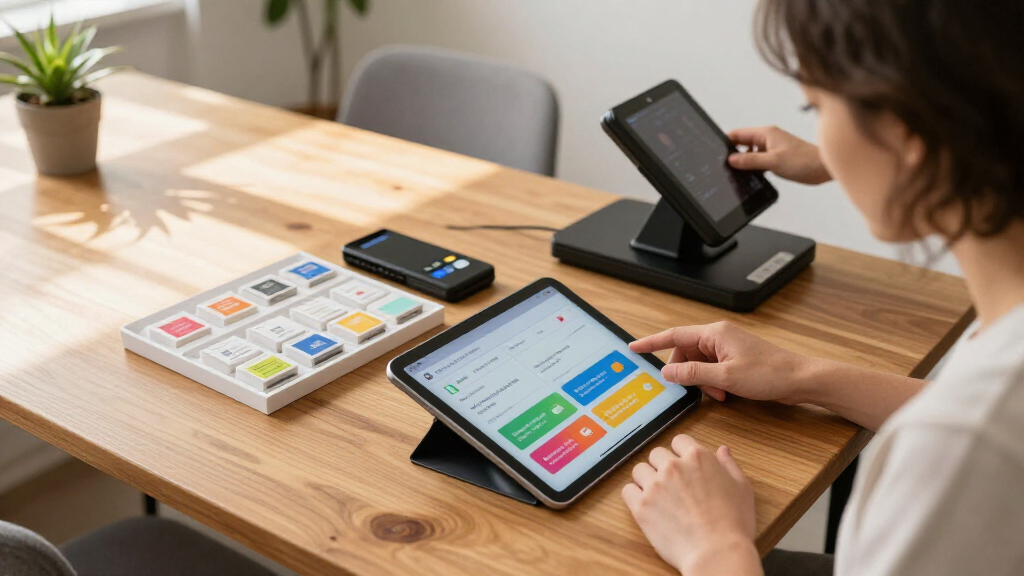
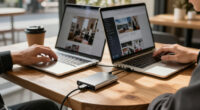
This checklist is for direct sellers preparing a presentation table, product demonstration, or in-person event. It covers the supplies that help organize a display and support the presentation itself, with practical fit in mind.

Get business pricing on office and shipping supplies
- Business-only prices and quantity discounts
- Tax-exempt purchasing
- Multiple users, one account, clear invoices
The sections follow the setup: start with the display surface, then consider branding and samples, followed by presentation lighting, a remote, and a place for business cards. Product picks appear where provided; the runner and sample-container sections offer selection advice.
Use each section to compare the pick with your venue, products, and presentation style. Check dimensions, compatibility, and what is included before buying, and prioritize the items that address your biggest setup needs.
Portable product display stand
A portable stand can give a presentation a defined surface for products, handouts, or demonstration materials. The listed pick is the Portable Pop Up Podium Counter Table Stand for Trade Shows and Present. Before choosing it, confirm its assembled dimensions and how much usable surface it offers. Those details help you judge whether it suits your display plan and fits the spaces you expect to use. Surface area matters when products need to remain visible without crowding the presentation.
A common buying mistake is focusing only on portability while overlooking setup and transport. Check the product details for folded dimensions, assembly steps, and any carrying case or accessories included. Compare the stand’s footprint with your available booth or table area, and consider whether you can reach products and materials comfortably while presenting. If the stand will support heavier items, look for stated capacity rather than assuming it from its appearance. Capacity and setup should match your actual display.
Also consider height in relation to the way you plan to demonstrate products. A surface that is too low or too high may make browsing awkward. Confirm that the chosen stand works with your signage and any separate table covering. Measure first and verify the listed specifications before purchasing.
What to look for:
- Assembled dimensions and usable surface area
- Folded dimensions for storage and transport
- Assembly steps and included carrying accessories
- Stated weight capacity for displayed items
- Surface height and fit with signage
Portable Pop Up Podium Counter Table Stand for Trade Shows and Presentations

This portable, foldable podium features a lightweight aluminum frame, detachable boards, and a fabric wrap for easy transport and setup. It includes large storage shelves and is suitable for exhibitions, trade shows, speeches, and product displays.
Pros:
- Lightweight and portable with foldable design
- Easy to set up without tools
- Sturdy construction supports up to 44.1 lbs
- Ample storage space with 2 shelves
Cons:
- May require space for assembly
- Limited weight capacity for very heavy items
- Fabric wrap may wear over time
Best for: Direct sellers who need a portable presentation surface
Not ideal for: Displays that require dimensions or capacity not confirmed in the listing
Bottom line: Confirm its footprint, setup details, and stated capacity against your event plan.
Branded table runner
A table runner can make a display feel coordinated while leaving some of the table surface available for products and materials. Because no specific product is listed, choose one by matching its dimensions to the table you expect to use. Measure the tabletop and consider how far you want the runner to hang over each edge. Table measurements help avoid a runner that overwhelms the display or leaves too little coverage.
A frequent mistake is choosing a design before checking fit and fabric care. Look for the listed length and width, material, and washing or cleaning instructions. Think about how the runner will sit alongside product packaging, signs, and any display stand. If you need branding, confirm how the design is applied and whether the seller provides a preview or proof. Do not assume a logo will be legible at a distance; check the artwork size and placement. Readable branding depends on the finished layout.
For compatibility, check whether the runner is made for a flat tabletop or a particular table shape. Consider the edge length and how the fabric behaves around corners. Keep the display usable: leave room for samples, business cards, and other materials you plan to place on the table. Plan the full layout before ordering so the runner complements rather than competes with the products.
What to look for:
- Runner dimensions matched to the event table
- Material and cleaning instructions
- Logo size, placement, and artwork proof
- Fit around table edges and corners
- Space remaining for products and presentation materials
Product sample containers
Sample containers help keep demonstration products grouped and easy to handle. No particular container is specified here, so start with the product being sampled and the way guests will use it. Check each container’s capacity, opening, and closure against the sample’s size and consistency. Product compatibility is the first filter: a container should be suitable for the contents and practical to open or dispense.
A common mistake is buying based on appearance or quantity alone. Verify the material and any stated use guidance, especially if samples may be carried, stored, or handled repeatedly. Check whether the containers are reusable or intended for one-time use, and look for cleaning instructions if reuse matters. For products that require individual portions, compare the stated capacity with the amount you want each container to hold. Capacity and care affect how useful the set will be.
Consider presentation and fit as well. Containers should be easy to identify, arrange, and replenish without taking over the display. If labels are needed, confirm that the surface allows them to stay in place and that there is enough room for the information you plan to include. Check dimensions against any trays, cases, or bags used for transport. Test the arrangement with your display plan before committing to a large quantity.
What to look for:
- Material and stated suitability for the sample contents
- Capacity matched to the portion size
- Closure or dispensing style for the product
- Cleaning and reuse guidance
- Dimensions that fit labels, trays, and transport storage
Wireless presentation clicker
A wireless clicker can let you advance a presentation while moving around the room. The listed pick is the Logitech Spotlight Wireless Presentation Remote, Black. Check the product information for its supported devices, connection method, and operating-system compatibility before buying. Device compatibility is essential: a remote that does not work with your presentation setup will not help during the event.
A common buying mistake is assuming every remote supports the same controls or connection options. Review the listed functions and compare them with how you present, including whether you need slide navigation, a pointer, or other controls described by the manufacturer. Check what is included, such as a receiver or charging cable, and note any stated setup requirements. If you use a work computer with restricted software or ports, confirm that the remote’s connection approach works with it. Connection details deserve a check before event day.
Think about the room and your movement, too. Look for the manufacturer’s stated operating range and compare it with the distance between your presentation position and the computer. Check the remote’s size and controls if you will hold it for an extended session. Test pairing and the buttons with your presentation software before relying on it live. A quick compatibility test can surface setup issues while there is still time to adjust.
What to look for:
- Supported operating systems and devices
- Connection method and included receiver or cable
- Controls that match your presentation needs
- Manufacturer-stated operating range
- Charging or power requirements and setup steps
Logitech Spotlight Wireless Presentation Remote, Black

The Logitech Spotlight is a wireless presentation remote with an advanced pointer for highlighting and magnifying on-screen content, navigating slides, and controlling media. It connects via USB-A receiver or Bluetooth, works with major operating systems and presentation software, and offers a 30-meter range with quick charging.
Pros:
- Highlights and magnifies on-screen content
- Supports both USB-A receiver and Bluetooth connectivity
- Works with major operating systems and presentation software
- Offers vibration alerts and a range of up to 30 meters
Cons:
- Some features require the Logi Options+ app
- Battery life may vary with environmental and computing conditions
Best for: Presenters who want to advance slides away from the computer
Not ideal for: Setups whose device and connection compatibility are unconfirmed
Bottom line: Confirm device support, connection details, and range, then test it with your presentation.
Portable ring light
A portable light can help you manage how you appear on camera during a presentation or product demonstration. The listed pick is the Logitech Litra Glow Premium LED Streaming Light for Creators. Check the product details for its mounting method, power requirements, and compatibility with your camera or workspace. Mounting and power should suit the desk, monitor, or other setup where you plan to use it.
A common mistake is choosing a light without considering placement. Review the light’s dimensions and included mounting hardware, then compare those with the available space around your camera and screen. Look for listed brightness or color controls and decide whether they fit your lighting needs. Check whether the light can be adjusted to avoid glare on glasses, screens, or shiny product packaging. Adjustability and placement matter as much as the light itself.
If you plan to travel with it, look for details on portability, storage, and how it receives power. Confirm whether any cable, adapter, or mount you need is included. Consider how the light will work alongside room lighting and the camera angle; test the setup on screen before presenting. For product demonstrations, check that the light does not create reflections that obscure details. Test the finished setup with your actual camera and presentation position.
What to look for:
- Mounting method and included hardware
- Power source, cable, and adapter details
- Available brightness or color controls
- Dimensions and portability for storage or travel
- Placement options that work with your camera and products
Logitech Litra Glow Premium LED Streaming Light for Creators
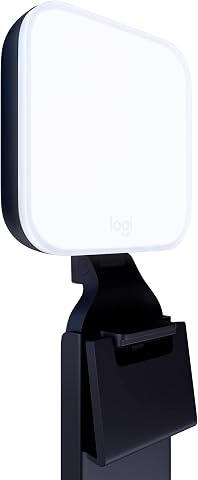
The Logitech Litra Glow provides full-spectrum, adjustable LED lighting with cinematic color accuracy, ideal for video conferencing, streaming, and content creation. Its frameless diffuser offers wide, soft light that reduces harsh shadows, and it features adjustable mount and customizable settings for perfect on-camera appearance.
Pros:
- Delivers natural skin tones with cinematic color accuracy
- Wide, soft light reduces harsh shadows
- Adjustable mount and customizable settings for precise positioning
- Portable and easy to set up
Cons:
- Requires USB connection and software for full control
- May be more expensive than basic lighting options
Best for: Sellers presenting on camera who need controllable lighting
Not ideal for: Setups without a compatible mounting point or power source
Bottom line: Check the mount and power details, then test for glare in your camera view.
Business card holder
A business card holder keeps cards together and gives visitors a clear place to pick one up. The listed pick is the Gothic Skull Business Card Holder for Tattoo Artists – Professional De. Before choosing it, check the product dimensions and the card size it accepts. The product name suggests a distinctive style, so consider whether that look fits the audience and tone of your event. Card fit and presentation should both work for your setting.
A common buying mistake is assuming that any holder fits standard cards or holds enough for an event. Verify the internal dimensions, stated capacity, and whether cards are displayed upright or laid flat. Check how cards are loaded and removed; an awkward opening can make replenishing the holder harder during a busy session. Look at the material and care guidance if the holder will travel between events. Capacity and access are practical details worth confirming.
Consider where the holder will sit on the table and how it relates to your other display items. Measure the space available, especially if the tabletop is already occupied by samples or a stand. If the design is highly themed, decide whether it supports the impression you want to make with prospective customers. Confirm the complete product description, since the provided name ends with “Professional De.” Review the full listing for dimensions, finish, and what is included.
What to look for:
- Internal dimensions matched to your business cards
- Stated card capacity
- Card loading and removal access
- Holder footprint and tabletop stability
- Full product description, material, and care details
Gothic Skull Business Card Holder for Tattoo Artists – Professional Desk Card Ho

This gothic skull business card holder is designed for tattoo artists and alternative professionals, offering a bold display for standard 3.5" x 2" cards. Made from durable materials with detailed gothic motifs, it adds a distinctive touch to any workspace or reception area.
Pros:
- Unique gothic design enhances workspace aesthetics
- Made with durable, high-quality materials
- Fits standard business cards snugly for a professional look
- Ideal gift for tattoo artists and alternative professionals
Cons:
- Limited to standard card size, not suitable for larger cards
- Design may not appeal to traditional or conservative settings
Best for: Tattoo artists or sellers seeking a themed card holder
Not ideal for: Displays where a neutral style is preferred
Bottom line: Check card fit, capacity, footprint, and the complete listing details.
Build your setup in a practical order: first confirm the display surface and table dimensions, then choose a runner and sample containers that fit the products. Next check the card holder and presentation tools against the space, devices, and power available. Start with fit and compatibility so each purchase works with the rest of your setup.
You do not need to assemble everything at once. Use the checklist to identify the gaps that matter most for your next event, verify product details, and add supplies as your presentation takes shape. A well-planned display makes it easier to focus on the people and products in front of you.
Halloween Picks

Govee Outdoor Halloween Projector Light, 3D Dynamic Visual Holiday Decor

11.2-Foot Halloween Inflatable Pumpkin with LED Lights

MGparty 10FT Halloween Inflatable Archway with LED Lights
As an affiliate, we earn on qualifying purchases.