This checklist is for small-business owners who handle their own shipping, packing, and checkout—whether you sell online, in person, or both. It covers practical equipment for common daily tasks, from preparing parcels to processing transactions.

Get business pricing on office and shipping supplies
- Business-only prices and quantity discounts
- Tax-exempt purchasing
- Multiple users, one account, clear invoices
The sections follow the workflow: shipping labels and weights, packing tape, barcode scanning, then receipts and cash handling. Each slot includes a specific pick, plus guidance on what to check before choosing equipment for your setup.
Use the checklist to compare each item with your devices, workspace, and order volume. Confirm compatibility and fit for your needs before buying, and prioritize the tools that address the biggest bottlenecks in your current operation.
Shipping label printer
A dedicated label printer can make shipping more organized when your business regularly prepares parcels. The Rollo Wireless Shipping Label Printer is listed as a Wi-Fi, 4×6 thermal label printer, so check that its wireless setup and label format suit the way you create and print shipping labels. Before choosing, confirm that your shipping workflow can send labels to this printer and that its connection options work with the devices you use.
A common buying mistake is assuming that a printer will work with every shipping platform or device simply because it is wireless. Verify compatibility with your operating system and label-printing process, and check the printer’s supported label dimensions against the labels you plan to use. Also consider where it will sit: leave room for loading labels and handling the printed output, and make sure its placement is practical for whoever packs orders. The product name identifies this pick as a 4×6 thermal printer; check the current product details for any additional requirements or included accessories before ordering.
What to look for:
- Confirm your shipping workflow supports the printer.
- Check device and operating-system compatibility.
- Match supported label dimensions to your labels.
- Plan accessible space for loading and printing.
- Review current setup requirements and included accessories.
Rollo Wireless Shipping Label Printer – Wi‑Fi 4×6 Thermal Label Printer

The Rollo wireless label printer uses direct thermal technology to print 4×6 shipping labels at up to one label per second without ink or toner. It connects via Wi‑Fi or USB and supports AirPrint for iOS/macOS as well as Android, Windows, Chromebook and Linux.
Pros:
- Direct thermal printing eliminates the need for ink or toner.
- High‑speed output of up to one 4×6 label per second.
- Wireless AirPrint and Wi‑Fi support across iOS, Android, Windows, macOS, Linux and Chrome OS.
- Free Rollo Ship Manager app offers discounted shipping rates and custom label creation.
Cons:
- Requires proprietary thermal labels; cannot use regular paper.
- Maximum label width limited to 4.1 inches.
- No built‑in battery; must remain plugged in for operation.
Best for: Small businesses seeking a Wi-Fi 4×6 thermal label printer
Not ideal for: Businesses that have not confirmed platform or device compatibility
Bottom line: Choose this printer after verifying that its wireless setup and label format fit your shipping workflow.
Shipping scale
Weighing parcels before shipment helps make package preparation more deliberate. The Amazon Basics Digital Shipping Postal Scale is named with a tare function and a 660 lb capacity, so consider whether its stated capacity and tare feature match the parcels and containers you handle. Tare can matter when you need to account for a container separately, but check the product instructions to understand how to use the function correctly.
Do not choose a scale based on capacity alone. Check the display, measurement units, and weighing surface in the current product details, then compare them with your typical package sizes and workspace. A frequent mistake is overlooking whether a parcel can sit securely on the platform or whether the readout is easy to see once a box is placed. Leave enough stable, level surface for the scale, and confirm that its power and operating requirements fit your packing area. The product name gives the stated 660 lb capacity; verify that this suits your actual shipping needs rather than assuming it is the right range for every business.
What to look for:
- Check that the stated capacity fits your parcels.
- Confirm the tare function suits your weighing routine.
- Review display and measurement-unit details.
- Make sure packages can sit securely on the weighing surface.
- Plan a stable, level spot in your packing area.
Amazon Basics Digital Shipping Postal Scale with Tare Function, 660 lb Capacity,

This digital postal scale is designed for weighing shipping items with a heavy-duty yet portable build. It features a large back-lit LCD display, tare function, and multiple measurement units, supporting up to 660 pounds with 0.1-ounce precision.
Pros:
- High weight capacity of 660 pounds
- Large back-lit LCD for easy reading
- Multiple measurement units and tare function
Cons:
- Data cannot be transferred via USB
- Requires batteries or AC power for operation
Best for: Businesses whose parcel needs fit the stated capacity
Not ideal for: Operations that need a different capacity or weighing setup
Bottom line: Match the scale’s stated capacity and tare function to your actual packages and packing space.
Packing tape dispenser
A hand dispenser can make routine box sealing easier to manage at a packing station. The 3M Scotch Box Sealing Tape Hand Dispenser H180 is specified for 2-inch tape, so first confirm that this width matches the tape you use. Choosing a dispenser without checking tape compatibility is a simple but avoidable mistake; also review the product details for the tape type and loading instructions that apply to this model.
Fit matters for both the tool and the person using it. Consider whether the dispenser is comfortable to hold during your usual packing routine and whether there is room to store it within reach without crowding other supplies. If multiple people pack orders, make sure they can handle the dispenser safely and reload it as needed. The pick is identified as a hand dispenser for 2-inch tape; do not assume it will accommodate other widths. Check the current listing for included components and setup guidance, and keep compatible tape available so the dispenser fits naturally into your packing workflow.
What to look for:
- Match the dispenser to 2-inch tape.
- Check compatibility with the tape you plan to use.
- Review loading and setup instructions.
- Consider grip and ease of use for your packers.
- Reserve accessible storage near the packing area.
3M Scotch Box Sealing Tape Hand Dispenser H180 for 2" Tape, Gray

This hand-held tape dispenser is designed for efficient sealing of shipping boxes in various settings. Made of durable plastic and metal, it features adjustable tension control and a pistol grip for easy one-handed operation, suitable for 2-inch tape rolls up to 60 yards long.
Pros:
- Durable construction suitable for high-volume use
- Adjustable tension control for optimal sealing
- Pistol grip allows for easy one-handed operation
Cons:
- Designed for industrial use only, not for consumers
- Limited to 2-inch tape rolls
- May be heavy for prolonged use
Best for: Packing stations that use compatible 2-inch tape
Not ideal for: Businesses that rely on tape widths this dispenser does not fit
Bottom line: Confirm your tape width and handling needs before adding this dispenser to your packing station.
Barcode scanner
A barcode scanner can support product lookup and checkout workflows, but only when it works with the systems and codes your business uses. The Tera Wireless Barcode Scanner with Screen is described as a Pro Version 1D/2D/QR scanner with Bluetooth. Check that its supported code types cover the labels or products you scan and that its wireless connection is compatible with your point-of-sale device or computer.
One common mistake is treating “wireless” as a guarantee of straightforward pairing or compatibility. Confirm the supported operating systems, connection steps, and software requirements in the current product details. Consider whether the screen is useful for your scanning routine, and check the scanner’s dimensions and charging or power arrangements so it suits your counter or stockroom. If your business depends on particular barcode formats, verify them before purchase rather than relying on the broad 1D/2D/QR description alone. Plan a brief test with your actual devices and products before building the scanner into an essential checkout or inventory process.
What to look for:
- Verify the barcode formats your workflow requires.
- Confirm Bluetooth and device compatibility.
- Review operating-system and software requirements.
- Check screen, size, and power details.
- Test with your actual products and checkout setup.
Tera Wireless Barcode Scanner with Screen, Pro Version 1D/2D/QR, Bluetooth, 2.4G
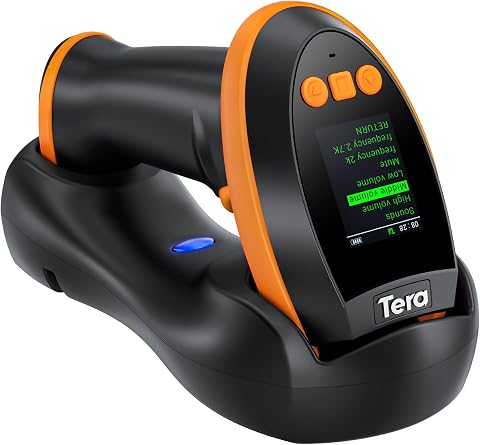
The Tera HW0009 is a versatile wireless barcode scanner featuring a customizable screen for setting adjustments. It offers fast, accurate reading of various barcode formats, including high-density and challenging types, with a large 2500mAh battery for all-day use.
Pros:
- Customizable screen for personalized settings
- Fast and accurate barcode scanning including high-density formats
- Multiple connection options with long wireless range
- Large battery supports all-day operation
Cons:
- Requires pairing setup via barcode scan
- Bulkier design due to screen and cradle
- Potentially complex configuration for some users
Best for: Businesses needing compatible 1D, 2D, or QR scanning
Not ideal for: Setups that require unverified software or connection support
Bottom line: Confirm code-format and device compatibility before making this scanner part of checkout or inventory.
Receipt printer
A receipt printer is useful only if it fits the devices and checkout process you already use. The Star Micronics TSP143IIIBi Bluetooth Thermal Receipt Printer is identified as a Bluetooth thermal printer for iOS, making iOS compatibility a key detail to verify. Check that your point-of-sale app supports this specific printer and that your iOS devices can connect through the required setup.
A common mistake is buying a printer based on a general connection label without checking the exact app and hardware combination. Review the current product details for paper requirements, supported devices, setup steps, and any needed accessories. Consider the counter space available and how printed receipts will be collected without interrupting checkout. If you use more than one device or checkout station, confirm that your intended arrangement is supported instead of assuming the printer will serve every station. The product name calls out Bluetooth and iOS; treat those as starting points for compatibility checks, not as confirmation that every iOS-based register will work.
What to look for:
- Confirm support in your specific point-of-sale app.
- Verify compatibility with your iOS devices.
- Check paper and setup requirements.
- Plan counter space and receipt handling.
- Confirm the printer suits your number of checkout stations.
Star Micronics TSP143IIIBi Bluetooth Thermal Receipt Printer for iOS, Android, a

This thermal receipt printer offers high-speed printing of 43 receipts per minute with easy Bluetooth setup. Its drop-in design allows for quick paper loading, and it features a patented de-curl function for flat receipts.
Pros:
- Fast printing speed of 43 receipts per minute
- Easy Bluetooth setup with simple pairing
- Drop-in paper loading design for convenience
- Compact size saves counter space
Cons:
- Limited to Bluetooth connectivity (no Wi-Fi option)
- Requires compatible devices for full functionality
Best for: Checkout setups confirmed to support this iOS printer
Not ideal for: Businesses using apps or devices with unverified compatibility
Bottom line: Verify your exact POS app, iOS device, and receipt-paper requirements before choosing this printer.
Cash drawer
A cash-handling station should fit the way your business takes payments and organizes checkout. The listed pick is the All-in-One SmartPOS-129 Professional Cash Register for Small Business. Because the product name identifies it as a cash register, review the current product information to understand its functions, included components, and how it fits with the rest of your checkout equipment.
Do not assume that an all-in-one register will connect to every receipt printer, scanner, payment method, or software system. Confirm compatibility with your existing point-of-sale workflow and check the physical dimensions against the counter or register area where it will sit. Consider who will use it and whether the layout suits your cash-handling routine. If your operation relies on specific peripherals or software, list those requirements before deciding, then verify each one against the product details. The product name alone does not establish peripheral or software compatibility, so make that a priority in your final checks.
What to look for:
- Review the register’s current functions and included components.
- Confirm compatibility with your POS workflow.
- Check support for any required scanner or receipt printer.
- Measure the counter space available.
- Verify that its layout suits your cash-handling routine.
All-in-One SmartPOS-129 Professional Cash Register for Small Business, POS Bundl
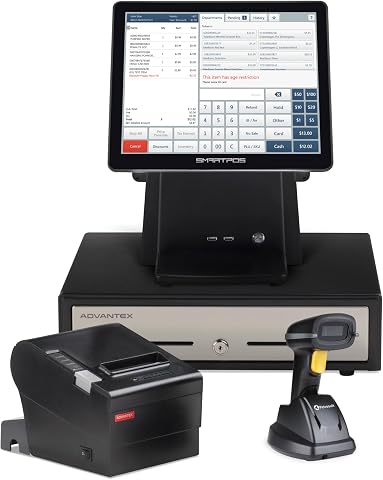
The SmartPOS 129 is a professional all-in-one POS system designed for small businesses, featuring a 15-inch cashier touchscreen, customer-facing display, cash drawer, thermal printer, and barcode scanner. It offers seamless integration with card processors and a free mobile app for easy management and checkout.
Pros:
- All-in-one system with comprehensive hardware included
- No hidden fees or subscriptions
- Easy setup with free support and mobile app
Cons:
- Requires space for multiple components
- Potential learning curve for new users
Best for: Small businesses comparing a named cash-register option
Not ideal for: Setups requiring peripheral support that has not been confirmed
Bottom line: Check the register’s functions, dimensions, and system compatibility against your complete checkout setup.
Build the setup in a budget-first order by addressing the most immediate operational bottleneck: start with the shipping tools you need to weigh and label parcels, then add a tape dispenser if packing is a regular task. For checkout, confirm your app and device requirements before choosing a scanner, receipt printer, or register. That sequence helps keep purchases tied to specific daily needs rather than assumptions.
Before ordering, check current product details, compatibility, dimensions, and setup requirements for every pick. A short list of must-haves—devices, labels, tape width, parcel capacity, and checkout connections—can make comparisons easier. You do not have to outfit every workflow at once: choose the next tool that will make your operation more manageable, and build from there.