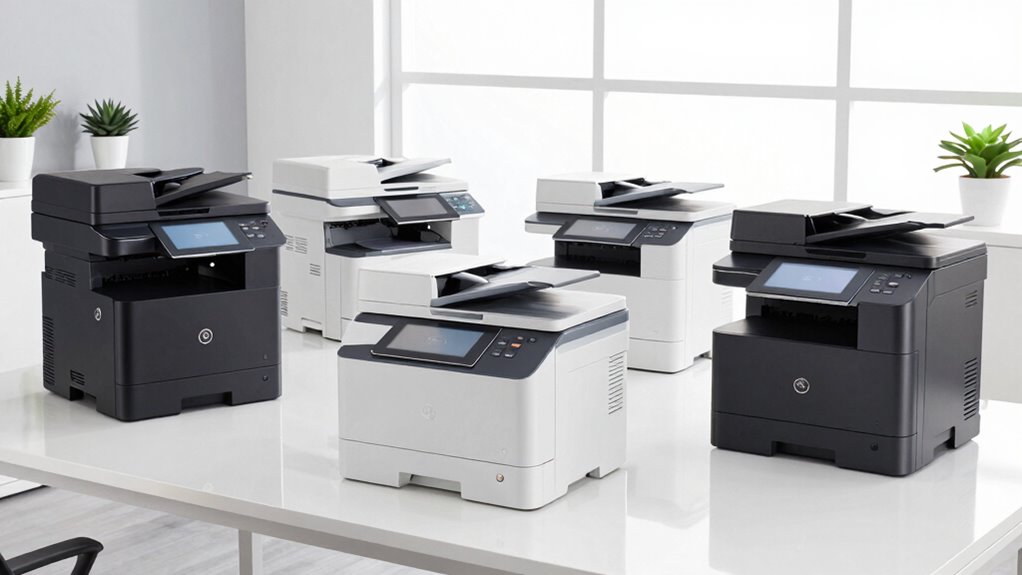

Choosing the right all-in-one laser printer for a small business involves balancing speed, functionality, color capabilities, and cost. The HP Color LaserJet Pro MFP 3301cdw stands out for its compact design and reliable wireless features, making it ideal for smaller teams needing color printing. For those prioritizing high volume and security, the Brother MFC-L8930CDW offers faster speeds and advanced security features, though it comes with a larger footprint. The Brother DCP-L2640DW and Brother HL-L2480DW deliver excellent monochrome performance in a smaller size, perfect for basic tasks, but lack color printing. Lastly, the Brother MFC-L2820DW combines all essential functions in a compact, secure package for small offices. Each choice involves tradeoffs between color capability, speed, size, and complexity, so understanding these differences helps in making the best decision for your business needs.

Get business pricing on office and shipping supplies
- Business-only prices and quantity discounts
- Tax-exempt purchasing
- Multiple users, one account, clear invoices
Key Takeaways
- Color laser printers like the HP 3301cdw are best for small teams needing vibrant, versatile output but tend to be more costly to operate.
- High-volume workplaces benefit from the Brother MFC-L8930CDW’s speed, security, and high-yield toner options, though it requires more space.
- Monochrome models such as the Brother DCP-L2640DW and HL-L2480DW excel at fast, reliable printing with a smaller footprint and lower operational costs.
- The Brother MFC-L2820DW offers a balanced mix of features, including fax and cloud integration, suitable for small offices with diverse needs.
- Tradeoffs include size, color capabilities, and complexity—consider what features are most critical for your workflow.
| HP Color LaserJet Pro MFP 3301cdw Wireless All-in-One Printer (Renewed) |  | Best Overall for Small Teams Needing Color | Technology: Laser | Connectivity: Dual-band Wi-Fi with Auto-Reconnect | Functions: Print, Scan, Copy, Fax | VIEW ON AMAZON | See Our Full Breakdown |
| Brother MFC-L8930CDW Business Color Laser All-in-One Printer with Duplex Print, Scan, Copy, Low-Cost Printing, and Advanced Security Features |  | Best for High-Demand, Security-Conscious Workplaces | Print Speed: Up to 33 ppm | Scan Speed: Up to 104 ipm | Auto Document Feeder: 80 pages | VIEW ON AMAZON | See Our Full Breakdown |
| Brother DCP-L2640DW Wireless Monochrome Multi-Function Laser Printer with Copy and Scan |  | Best Compact Monochrome for Small Spaces | Print Speed: 36 pages per minute | Scan Speed: 23.6/7.9 ipm | Auto Document Feeder: 50 pages | VIEW ON AMAZON | See Our Full Breakdown |
| Brother HL-L2480DW Wireless Monochrome Multi-Function Laser Printer with Copy and Scan |  | Best Budget Monochrome for Small Offices | Print Speed: Up to 36 ppm | Paper Capacity: 250 sheets | Connectivity: Wireless, Ethernet, USB | VIEW ON AMAZON | See Our Full Breakdown |
| Brother MFC-L2820DW Wireless Monochrome All-in-One Laser Printer with Copy, Scan, and Fax |  | Best All-in-One for Small Offices with Fax | Print Speed: Up to 36 ppm | Scan Speed: 23.6/7.9 ipm | Auto Document Feeder: 50 pages | VIEW ON AMAZON | See Our Full Breakdown |
| all in one laser printers for small business | Connectivity | Print Speed | Scan Speed | Auto Document Feeder |
|---|---|---|---|---|
| HP Color LaserJet Pro MFP 3301 | Dual-band Wi-Fi with Auto-Reconnect | Up to 26 pages per minute | — | — |
| Brother MFC-L8930CDW Business | Wireless, Gigabit Ethernet | Up to 33 ppm | Up to 104 ipm | 80 pages |
| Brother DCP-L2640DW Wireless M | Wireless, Ethernet, USB 2.0 | 36 pages per minute | 23.6/7.9 ipm | 50 pages |
| Brother HL-L2480DW Wireless Mo | Wireless, Ethernet, USB | Up to 36 ppm | — | — |
| Brother MFC-L2820DW Wireless M | Wireless, Ethernet, USB | Up to 36 ppm | 23.6/7.9 ipm | 50 pages |
More Details on Our Top Picks
HP Color LaserJet Pro MFP 3301cdw Wireless All-in-One Printer (Renewed)
This model stands out for its space-saving design and reliable wireless connection, making it ideal for small offices that need versatile color printing. Its high-speed output of 26 ppm and automatic duplex printing improve productivity, while Auto-On/Auto-Off technology helps reduce energy costs. Compared with monochrome options, the color capability adds versatility but increases operational costs. The renewed status may also limit warranty coverage, so it’s better suited for users comfortable with some uncertainty. Its main tradeoff is the higher cost of color laser toner, which could impact ongoing expenses.
Pros:- Fast printing speeds up to 26 ppm
- All-in-one functionality (print, scan, copy, fax)
- Reliable dual-band Wi-Fi with auto-reconnect
- Compact, space-efficient design
Cons:- Renewed unit may have limited warranty
- Color laser printing is more expensive than monochrome
- Larger footprint than basic printers
Best for: Small teams needing reliable color printing with space constraints
Not ideal for: High-volume printers or users with tight budgets on toner costs
- Technology:Laser
- Connectivity:Dual-band Wi-Fi with Auto-Reconnect
- Functions:Print, Scan, Copy, Fax
- Print Speed:Up to 26 pages per minute
- Two-Sided Printing:Automatic duplex
- Energy Efficiency:Auto-On/Auto-Off
Our verdict“A dependable, space-efficient color laser printer for small teams, with the main tradeoff being higher ongoing toner costs.”
Brother MFC-L8930CDW Business Color Laser All-in-One Printer with Duplex Print, Scan, Copy, Low-Cost Printing, and Advanced Security Features
This model is ideal for busy small businesses requiring fast output and robust security. It offers impressive speeds of up to 33 ppm for printing and a high-capacity 80-page auto document feeder, making large jobs manageable. Its 7-inch touchscreen simplifies operation, and security features like NFC and triple-layer security help protect sensitive information. However, its size and setup complexity may be drawbacks for smaller or less tech-savvy teams. The high initial investment is offset by the high-yield toner options, which lower long-term costs in high-volume use.
Pros:- Fast print and scan speeds improve workflow
- Advanced security features including NFC and triple-layer security
- High-yield toner options for reduced operating costs
- Large touchscreen for easy navigation
Cons:- Requires internet connection for full feature set
- Complex setup process
- Large footprint may not fit smaller spaces
Best for: High-volume offices needing security and speed
Not ideal for: Budget-conscious users or small teams with limited space
- Print Speed:Up to 33 ppm
- Scan Speed:Up to 104 ipm
- Auto Document Feeder:80 pages
- Connectivity:Wireless, Gigabit Ethernet
- Security:Triple Layer Security, NFC
- Toner Yield:High-yield: 7,500 black / 6,500 color
Our verdict“A powerhouse for demanding offices prioritizing security and speed, though it demands space and setup effort.”
Brother DCP-L2640DW Wireless Monochrome Multi-Function Laser Printer with Copy and Scan
This monochrome model offers excellent speed—up to 36 ppm—and a 50-page auto document feeder, making it well-suited for basic office needs. Its compact size fits easily into tight spaces, and multiple connectivity options including wireless and Ethernet support flexible workflows. The absence of color limits its use for visual documents, but for simple printing, copying, and scanning, it’s highly reliable. The lack of a touchscreen could hinder ease of use for some, and toner costs may rise without high-yield options.
Pros:- Fast printing and scanning speeds
- Compact, space-saving design
- Multiple connectivity options
- Auto duplex printing reduces paper use
Cons:- Limited to monochrome printing
- No touchscreen interface
- Toner replacement may be frequent without high-yield cartridges
Best for: Small offices requiring fast monochrome printing in tight spaces
Not ideal for: Color printing needs or complex multi-function tasks involving high-volume color jobs
- Print Speed:36 pages per minute
- Scan Speed:23.6/7.9 ipm
- Auto Document Feeder:50 pages
- Connectivity:Wireless, Ethernet, USB 2.0
- Paper Capacity:250 sheets
- Energy Star:Yes
Our verdict“A compact, fast monochrome printer ideal for basic tasks in small offices with limited space.”
Brother HL-L2480DW Wireless Monochrome Multi-Function Laser Printer with Copy and Scan
This compact monochrome laser printer emphasizes affordability and efficiency. With speeds up to 36 ppm and automatic duplex printing, it handles everyday tasks with ease. Its 2.7-inch touchscreen simplifies operation, and cloud connectivity expands workflow options. While it’s limited to monochrome output, its lower initial cost and high paper capacity make it suitable for small teams focused on basic printing, copying, and scanning. However, toner replacement can become frequent without high-yield cartridges, and it lacks fax functionality, which could be a drawback for some users.
Pros:- Fast print and scan speeds
- Automatic duplex printing
- User-friendly touchscreen
- High-capacity paper tray
Cons:- Limited to monochrome printing
- Toner replacement may be frequent
- No fax functionality
Best for: Small offices seeking an affordable, reliable monochrome laser printer
Not ideal for: Color printing or offices needing fax capabilities
- Print Speed:Up to 36 ppm
- Paper Capacity:250 sheets
- Connectivity:Wireless, Ethernet, USB
- Touchscreen:2.7 inches
- Energy Star:Yes
Our verdict“A cost-effective monochrome printer with features suitable for small offices focused on fundamental tasks.”
Brother MFC-L2820DW Wireless Monochrome All-in-One Laser Printer with Copy, Scan, and Fax
This model combines the essential functions—printing, copying, scanning, and faxing—in a compact design suitable for small office setups. It delivers steady speeds of up to 36 ppm, with a 50-page auto document feeder, and features a user-friendly touchscreen. Its high-capacity paper tray reduces the need for frequent refills, and wired and wireless options support flexible connectivity. Its main limitation is monochrome-only output, which may not suit those needing color documents. The toner can also require frequent replacement, especially in high-use environments, unless high-yield cartridges are chosen.
Pros:- Fast print, copy, scan, and fax speeds
- Automatic duplexing and high-capacity tray
- Easy-to-use touchscreen
- Supports multiple connectivity options
Cons:- Limited to monochrome output
- Toner replacements may be frequent
- Some find initial setup complex
Best for: Small offices needing a complete multifunction device including fax
Not ideal for: Color printing or users with very limited space
- Print Speed:Up to 36 ppm
- Scan Speed:23.6/7.9 ipm
- Auto Document Feeder:50 pages
- Connectivity:Wireless, Ethernet, USB
- Paper Tray Capacity:250 sheets
- Functions:Print, Copy, Scan, Fax
Our verdict“A well-rounded all-in-one monochrome laser printer with fax, ideal for small offices with diverse needs but limited to black-and-white output.”

How We Picked
Our selection process prioritized models specifically designed for small business environments, emphasizing reliability, ease of use, and cost efficiency. We evaluated key features such as print speed, connectivity options, security, and total operational costs. To ensure relevance, we focused on devices that combine multiple functions—print, scan, copy, and fax—with compact designs suitable for small office spaces. We also considered user reviews and industry reputation, aiming to highlight options that balance performance with affordability. Models with advanced security features and high-yield toner options were favored for high-demand settings, while compact monochrome options suited budget-conscious or space-limited environments.
| all in one laser printers for small business | Connectivity |
|---|---|
| HP Color LaserJet Pro MFP 3301 | Dual-band Wi-Fi with Auto-Reconnect |
| Brother MFC-L8930CDW Business | Wireless, Gigabit Ethernet |
| Brother DCP-L2640DW Wireless M | Wireless, Ethernet, USB 2.0 |
| Brother HL-L2480DW Wireless Mo | Wireless, Ethernet, USB |
| Brother MFC-L2820DW Wireless M | Wireless, Ethernet, USB |
Factors to Consider When Choosing All In One Laser Printers For Small Business
Selecting the right all-in-one laser printer for your small business hinges on understanding your specific needs around color, speed, security, and space. The key is to balance these features against the budget and workflow requirements. Whether you prioritize color versatility, high-volume throughput, or compact size, this guide will walk through the essentials to help you narrow down options effectively.
Color vs. Monochrome
If your business produces visual materials or marketing collateral, a color laser printer like the HP 3301cdw offers vibrant output but generally at a higher operational cost. Monochrome models, such as the Brother DCP-L2640DW, excel at fast, cost-efficient printing of text documents, making them suitable for straightforward office tasks.
Speed and Volume
High-volume environments benefit from faster models like the Brother MFC-L8930CDW, which can handle large workloads with ease. For smaller teams with moderate needs, models like the Brother HL-L2480DW provide sufficient speed without overwhelming space or budget constraints.
Size and Space
Space constraints are common in small offices. Compact options like the HP Color LaserJet Pro 3301cdw or Brother DCP-L2640DW fit comfortably on desks or shelves, but larger multifunctions with additional features will require dedicated space.
Connectivity and Security
Wireless connectivity simplifies workflow, especially when multiple users share the device. Features such as NFC or secure login add layers of protection, which are increasingly important in small business environments handling sensitive data.
Cost Considerations
Initial purchase price is just one aspect. Ongoing toner costs, maintenance, and energy consumption influence total cost of ownership. High-yield toner cartridges can reduce long-term expenses, especially for high-volume users.
Frequently Asked Questions
What should I look for in a small business all-in-one laser printer?
Focus on print speed, multifunctionality, connectivity options, security features, and size. Prioritize models that balance cost with performance and consider whether color printing is necessary for your business needs.
Are color laser printers worth the extra cost for small businesses?
If your business frequently produces marketing materials, presentations, or visual documents, color laser printers can add value through vibrant output. However, they tend to have higher ongoing toner expenses, so consider if monochrome models meet your core needs.
How important is security in a small office laser printer?
Security features such as NFC authentication, secure printing, and encrypted data transmission protect sensitive business information. For businesses handling confidential documents, these features justify choosing models like the Brother MFC-L8930CDW.
Should I prioritize size or features?
If space is limited, compact models like the Brother DCP-L2640DW or HP 3301cdw are better suited. If your workflow demands advanced features like high-volume printing, scanning, and security, a larger model like the Brother MFC-L8930CDW may be more appropriate despite its size.
What about ongoing costs like toner and maintenance?
High-yield toner cartridges significantly lower replacement frequency and overall costs in high-volume environments. Regular maintenance and choosing energy-efficient models also contribute to reducing long-term expenses.
Conclusion
For small teams or budget-conscious startups, monochrome models like the Brother HL-L2480DW provide reliable performance at a lower cost. Growing businesses or those with security needs benefit from the advanced features and speed of the Brother MFC-L8930CDW. Small offices with limited space that don’t require color output should consider compact options like the Brother DCP-L2640DW. Meanwhile, businesses needing versatile color printing in a space-efficient form will find the HP Color LaserJet Pro MFP 3301cdw a fitting choice, provided operational costs are manageable. Each buyer should weigh their specific needs around color, volume, security, and space to select the best fit.
Halloween Picks

HOPOCO Halloween Pumpkin Fog Machine with 12 LED Colors & Remote Control

Haunted Hill Farm 2-Ft. Zombie Raccoon Halloween Animatronic

Halloween Inflatable Haunted House Maze – 20×20 ft with Removable Roof and Blower
As an affiliate, we earn on qualifying purchases.