
When selecting portable routers for booth internet backup, the priority is reliable, fast, and easy-to-use connectivity that can handle unpredictable network conditions. The GL.iNet GL-MT3000 Beryl AX stands out as the best overall due to its Wi-Fi 6 support, VPN capabilities, and multi-Gig port, making it ideal for demanding booth setups. For those needing simplicity, the TP-Link WiFi Travel Router offers a straightforward Wi-Fi 5 solution at a lower price. Tradeoffs in this category often involve balancing speed, ease of setup, and connectivity options, especially as some models prioritize advanced features over user-friendliness. Keep reading for a detailed breakdown of each option and what makes them suitable for different needs.

Get office and shipping supplies delivered free — and shop member deals
- Fast, free delivery on millions of items
- Access to Prime Big Deal Days deals on October 6–7
- Prime Video, Amazon Music and more included
Key Takeaways
- Wi-Fi 6 routers generally provide faster, more future-proof connectivity, but may come with a higher price tag.
- Built-in VPN support is a key feature for security-conscious booth setups, with models like the Beryl AX excelling in this area.
- Port flexibility, such as multi-Gig WAN ports and USB tethering, significantly enhances backup reliability and versatility.
- Ease of setup and management varies widely; models with touchscreens or simple apps save time during quick deployments.
- Price often correlates with features, but budget options can still offer solid performance for basic booth needs.
| GL.iNet GL-MT3000 Beryl AX Wi-Fi 6 Travel Router, 2.5G WAN, VPN, OpenWrt | 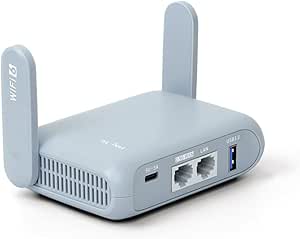 | Best Overall for Secure, High-Speed Travel Connectivity | Wireless Speed: 574Mbps (2.4G) + 2402Mbps (5G) | WAN Port: 2.5G Multi-gigabit | LAN Port: 1G gigabit | VIEW ON AMAZON | See Our Full Breakdown |
| GL.iNet GL-BE3600 Slate 7 Wi-Fi 7 Travel Router with Touchscreen |  | Best for User-Friendly High-Speed Travel Networking | Wireless Speed: 688Mbps (2.4G) + 2882Mbps (5G) | Ethernet Ports: 2.5G Ethernet (1x WAN, 1x LAN) | USB Port: USB 3.0 | VIEW ON AMAZON | See Our Full Breakdown |
| Roam 7 BE3600 Wi-Fi 7 Portable Travel Router Dual-Band, 2.5G Port, USB 3.0 |  | Best for High-Device Capacity and Versatile Modes | Wi-Fi Standard: Wi-Fi 7 | Bands: Dual-band (5 GHz and 2.4 GHz) | Max Speed: 2882 Mbps on 5 GHz | VIEW ON AMAZON | See Our Full Breakdown |
| TP-Link Roam 6 AX1500 Portable Wi-Fi 6 Travel Router |  | Best for Reliable Wi-Fi 6 Travel Coverage | Wi-Fi Standard: Wi-Fi 6 | Speed: 1201 Mbps on 5 GHz, 300 Mbps on 2.4 GHz | Dimensions: 4.09 in. × 3.54 in. × 1.10 in. | VIEW ON AMAZON | See Our Full Breakdown |
| Portable 4G/5G WiFi Hotspot, Unlocked Mobile WiFi Router with SIM Card Slot |  | Best for Mobile 4G/5G Internet on the Go | Connectivity: 5G, LTE | Maximum Data Rate: 300 Mbps | Supported Bands: LTE B1, B3, B5, B40 | VIEW ON AMAZON | See Our Full Breakdown |
| Roam 6 AX1500 Portable Wi-Fi 6 Travel Router Dual-Band USB C 3.0 |  | Best Overall for Travel and Remote Work | Wi-Fi Standard: Wi-Fi 6 | Max Speed: 1,201 Mbps (5 GHz), 300 Mbps (2.4 GHz) | Device Capacity: Up to 60 devices | VIEW ON AMAZON | See Our Full Breakdown |
| TP-Link AX1800 WiFi 6 Router (Archer AX21 V5) |  | Best for Extensive Coverage and Multiple Devices | Wi-Fi Standard: Wi-Fi 6 (802.11ax) | Total Bandwidth: 1.8 Gbps | 5 GHz Speed: up to 1200 Mbps | VIEW ON AMAZON | See Our Full Breakdown |
| TP-Link WiFi Travel Router (WiFi 5) | 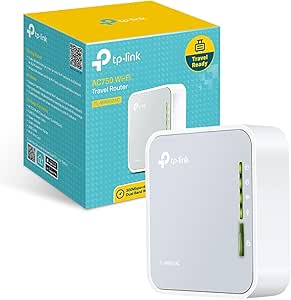 | Best for Budget-Conscious Travel and Basic Needs | WiFi Standard: WiFi 5 (802.11ac) | Dual Band: Yes | Speed: AC750 | VIEW ON AMAZON | See Our Full Breakdown |
| GL.iNet GL-SFT1200 Opal Travel Router, AC1200 Dual-Band Wi-Fi |  | Best for Secure, High-Speed Travel Connections | Wireless Speed: AC1200 (300 Mbps 2.4GHz + 867 Mbps 5GHz) | Ports: 2 Gigabit LAN, 1 Gigabit WAN | Weight: 145g | VIEW ON AMAZON | See Our Full Breakdown |
More Details on Our Top Picks
GL.iNet GL-MT3000 Beryl AX Wi-Fi 6 Travel Router, 2.5G WAN, VPN, OpenWrt
This model stands out for combining the latest Wi-Fi 6 technology with a multi-gigabit WAN port, providing fast and reliable internet in busy booth environments. Its support for OpenWrt firmware offers advanced customization and security, making it ideal for users who need control over their network setup. Compared with the TP-Link Roam 6, which lacks Wi-Fi 6 and runs on simpler firmware, the Beryl AX caters to those demanding higher speeds and security. However, its setup can be complex, especially for non-technical users, and VPN features require active subscriptions for full benefit. Its compact design ensures portability without sacrificing performance, but speed tests can fluctuate based on external network conditions.
Pros:- Supports Wi-Fi 6 with high-speed dual-band connectivity
- Built-in VPN client and server with strong security features
- Runs on customizable OpenWrt firmware for advanced users
- Compact and travel-friendly design
Cons:- Requires active VPN subscription for full functionality
- Setup may be complex for non-technical users
- Speed variability based on network conditions
Best for: Tech-savvy booth operators needing reliable, secure, and fast internet with customization options.
Not ideal for: Casual users seeking a plug-and-play solution without technical setup or firmware customization.
- Wireless Speed:574Mbps (2.4G) + 2402Mbps (5G)
- WAN Port:2.5G Multi-gigabit
- LAN Port:1G gigabit
- USB Port:USB 3.0
- VPN Support:OpenVPN, WireGuard
- Firmware:OpenWrt 21.02
Our verdict“This router is perfect for professionals who need high-speed, secure, and customizable internet backup in mobile settings.”
GL.iNet GL-BE3600 Slate 7 Wi-Fi 7 Travel Router with Touchscreen
This router makes a strong impression with Wi-Fi 7 support, offering blazing speeds up to 2882Mbps on 5GHz, far surpassing many competitors like the TP-Link Roam 6. Its touchscreen interface simplifies management, making it accessible for users who prefer straightforward controls over firmware tinkering. While the high speeds and user-friendly design are appealing, setup can still be complex for those unfamiliar with network configurations, and full VPN features depend on active subscriptions. Compared to the GL.iNet GL-MT3000, which relies on OpenWrt and Wi-Fi 6, the Slate 7 offers a more modern wireless standard and easier management but at a higher price point.
Pros:- Supports ultra-fast Wi-Fi 7 speeds
- Intuitive touchscreen interface for quick network control
- Supports advanced VPN configurations for security
- Supports multiple international plug types
Cons:- Requires VPN subscription for full security features
- Setup may be complex for non-technical users
- Performance depends on local network conditions
Best for: Travelers and remote workers who want high-speed Wi-Fi 7 with easy management features.
Not ideal for: Non-technical users or those on a budget who prefer simple, plug-and-play devices without touchscreen controls.
- Wireless Speed:688Mbps (2.4G) + 2882Mbps (5G)
- Ethernet Ports:2.5G Ethernet (1x WAN, 1x LAN)
- USB Port:USB 3.0
- Plug Types:US, UK, EU, AU
- Firmware:OpenWrt 23.05
- Storage:512MB
Our verdict“Ideal for tech-savvy users wanting cutting-edge Wi-Fi performance with simple management on the go.”
Roam 7 BE3600 Wi-Fi 7 Portable Travel Router Dual-Band, 2.5G Port, USB 3.0
The Roam 7 BE3600 excels in supporting a large number of devices—up to 90—making it stand out for busy booth environments or remote work scenarios with many users. Its Wi-Fi 7 support ensures high-speed wireless connectivity, comparable to the GL-BE3600 but with more flexible operation modes like hotspot, router, and access point, which the TP-Link Roam 6 lacks. However, it does not support the 6 GHz band, limiting future-proofing, and requires a compatible power source via USB-C, which might be inconvenient in some settings. Compared to the TP-Link Roam 6, it offers higher device capacity at the expense of slightly more complex setup and fewer supported bands.
Pros:- Supports up to 90 devices simultaneously
- Flexible modes including hotspot, router, and access point
- Supports high-speed Wi-Fi 7
- Long-lasting USB-C powered battery
Cons:- Does not support 6 GHz Wi-Fi band
- Requires compatible power source
- Setup complexity may be higher for novices
Best for: Event organizers or remote teams needing to connect multiple devices securely on the move.
Not ideal for: Casual travelers with few devices or those requiring 6 GHz Wi-Fi support for future compatibility.
- Wi-Fi Standard:Wi-Fi 7
- Bands:Dual-band (5 GHz and 2.4 GHz)
- Max Speed:2882 Mbps on 5 GHz
- Ports:1x 2.5 Gbps WAN, 1x 1 Gbps LAN, USB 3.0
- Supported Devices:Up to 90
- Power:USB-C
Our verdict“Best suited for busy environments needing extensive device connectivity with versatile operation modes.”
TP-Link Roam 6 AX1500 Portable Wi-Fi 6 Travel Router
This router offers solid Wi-Fi 6 speeds with a compact footprint, making it suitable for travelers who prioritize dependability over cutting-edge features. Its support for multiple modes—router, hotspot, extender—provides flexibility in various environments like hotels or airports. While it falls short against Wi-Fi 7 models like the Roam 7 in raw speed, the Roam 6 AX1500 still delivers reliable performance for most needs, especially if simplicity is preferred. Unlike the GL.iNet Beryl AX, which supports Wi-Fi 6 but with higher speeds, the TP-Link Roam 6 is less customizable due to the lack of OpenWrt firmware support, and its speeds can be affected by interference or environment.
Pros:- Compact, travel-friendly design
- Supports multiple modes for versatile use
- Fast Wi-Fi 6 speeds for streaming and general use
- Supports VPN for secure connections
Cons:- No support for OpenWrt firmware
- Wi-Fi speeds can vary with environment
- Requires external power source
Best for: Travelers seeking a dependable, straightforward Wi-Fi 6 solution for backup in diverse locations.
Not ideal for: Power users seeking firmware customization or the highest possible wireless speeds.
- Wi-Fi Standard:Wi-Fi 6
- Speed:1201 Mbps on 5 GHz, 300 Mbps on 2.4 GHz
- Dimensions:4.09 in. × 3.54 in. × 1.10 in.
- Power:USB-C, 5V/3A
- Modes:Router, Hotspot, Extender
Our verdict“This router is a practical choice for travelers who need reliable, secure Wi-Fi 6 backup without extra complexity.”
Portable 4G/5G WiFi Hotspot, Unlocked Mobile WiFi Router with SIM Card Slot
This hotspot provides a straightforward solution for travelers needing reliable cellular backup, supporting both 4G and 5G networks for speeds up to 300Mbps. Its SIM card slot makes it highly adaptable internationally, perfect for outdoor adventures or remote work where fixed internet isn’t available. While it supports up to 20 devices, it lacks the advanced wireless standards of Wi-Fi 6 or 7, and no waterproof features are included, which could be a concern in rugged outdoor settings. Compared to Wi-Fi routers like the GL.iNet models, this device excels in cellular connectivity but offers less network customization and security options.
Pros:- Supports both 4G and 5G networks for fast cellular data
- Connects up to 20 devices simultaneously
- Long battery life over 10 hours
- Easy to set up with SIM card compatibility
Cons:- Requires a compatible SIM card and carrier plan
- Limited to cellular networks, no Wi-Fi standard support
- No waterproof or rugged features
Best for: Travelers and outdoor enthusiasts needing mobile internet with wide device support.
Not ideal for: Office setups or booth environments where Wi-Fi infrastructure is preferred over cellular connections.
- Connectivity:5G, LTE
- Maximum Data Rate:300 Mbps
- Supported Bands:LTE B1, B3, B5, B40
- Devices Supported:Up to 20
- Battery Capacity:2100mAh
- Battery Life:Over 10 hours
Our verdict“This hotspot is ideal for outdoor or remote use when cellular coverage is the primary internet source.”
Roam 6 AX1500 Portable Wi-Fi 6 Travel Router Dual-Band USB C 3.0
The Roam 6 AX1500 stands out for its support of Wi-Fi 6 speeds up to 1,201 Mbps, making it ideal for travelers who need fast, reliable internet on the go. Compared with the GL.iNet GL-SFT1200, it offers higher speeds and supports up to 60 devices simultaneously, which is excellent for busy booths or remote work setups. However, this comes at the expense of lacking an internal battery, so it depends on external power sources, and it doesn’t support OpenWRT firmware for advanced customization. Its multiple modes—including router, access point, and repeater—offer flexibility, and VPN support enhances security for sensitive data. Still, Wi-Fi 6 compatibility limits its benefit to newer devices, and setup is straightforward but not as customizable as some firmware-based options. This pick makes the most sense for frequent travelers or remote workers who prioritize speed and device capacity over standalone portability.
Pros:- Supports Wi-Fi 6 speeds for fast, reliable connections
- Compact, portable design ideal for travel
- Multiple modes and secure VPN support
- Capable of connecting up to 60 devices
Cons:- No built-in battery, relies on external power
- Limited to Wi-Fi 6 compatible devices for full benefit
- Lacks support for OpenWRT firmware customization
Best for: Travelers and remote workers who need high-speed, multi-device Wi-Fi at the booth
Not ideal for: Users seeking a device with built-in battery or advanced firmware customization
- Wi-Fi Standard:Wi-Fi 6
- Max Speed:1,201 Mbps (5 GHz), 300 Mbps (2.4 GHz)
- Device Capacity:Up to 60 devices
- Ports:1 Gbps WAN/LAN port, 1 Gbps LAN port
- Power:USB-C port, 5V/3A PD power source
- Security:Supports OpenVPN and WireGuard
Our verdict“Best suited for travelers needing high-speed, multi-device Wi-Fi with flexible connection modes.”
TP-Link AX1800 WiFi 6 Router (Archer AX21 V5)
The TP-Link AX1800 (Archer AX21 V5) offers robust dual-band Wi-Fi 6 speeds up to 1.8 Gbps, making it a strong choice for larger booths or environments with many devices. Unlike the Roam 6 AX1500, it doesn’t support Wi-Fi 6E but compensates with high-gain antennas and beamforming that extend coverage and improve stability. It supports VPN server functionality for security, yet, its performance can vary depending on environment and device placement. Its extensive coverage makes it better suited for settings where device density and range matter more than portability. Compared to the GL.iNet GL-SFT1200, it provides higher throughput and better coverage but is less compact and portable. This model is ideal for users who need a powerful, fixed solution for booth setups with many connected devices, rather than frequent travel.
Pros:- Fast Wi-Fi 6 speeds supporting multiple devices
- Extensive coverage with beamforming and high-gain antennas
- Supports VPN server for added security
- Reliable, high-capacity connection for demanding environments
Cons:- Less portable due to size and fixed power needs
- Does not support Wi-Fi 6E or the 6 GHz band
- Performance depends on environment and device placement
Best for: Event booths or remote work setups requiring high throughput and wide coverage
Not ideal for: Travelers seeking ultra-compact solutions or devices with built-in batteries
- Wi-Fi Standard:Wi-Fi 6 (802.11ax)
- Total Bandwidth:1.8 Gbps
- 5 GHz Speed:up to 1200 Mbps
- 2.4 GHz Speed:up to 574 Mbps
- Antennas:4 high-gain antennas
- Security:Supports VPN server
Our verdict“Best for booth environments where wide coverage and high device capacity are priorities over portability.”
TP-Link WiFi Travel Router (WiFi 5)
The TP-Link WiFi Travel Router (WiFi 5) offers dual-band AC750 speeds, making it suitable for light travel needs like HD streaming and general browsing. Compared with the Roam 6 AX1500, it lacks Wi-Fi 6 capabilities but remains a lightweight, travel-sized option. Its dual-band support and Micro USB power make it versatile for hotel stays and short trips, though its limited speed isn’t ideal for high-bandwidth activities or dense device environments. Its simplicity makes setup straightforward, but the tradeoff is lower maximum throughput and potential performance issues in environments with many obstacles. This device makes sense for casual users who need reliable basic Wi-Fi without the high cost or bulk of advanced models, especially when budget is a concern.
Pros:- Compact and lightweight for travel
- Dual-band WiFi provides stable connections
- Versatile power options via Micro USB
- Affordable price point
Cons:- Limited to AC750 speeds, not suitable for high-bandwidth activities
- Performance varies with environment and obstacles
- No support for Wi-Fi 6 or advanced security features
Best for: Casual travelers or users with basic internet needs in hotels or small booths
Not ideal for: Power users or busy booths with many devices demanding high throughput
- WiFi Standard:WiFi 5 (802.11ac)
- Dual Band:Yes
- Speed:AC750
- Power:Micro USB
- Warranty:2 years
- Design:Travel-sized, lightweight
Our verdict“Best for budget-conscious travelers needing reliable basic Wi-Fi in simple booth setups.”
GL.iNet GL-SFT1200 Opal Travel Router, AC1200 Dual-Band Wi-Fi
The GL.iNet GL-SFT1200 Opal offers solid AC1200 dual-band Wi-Fi speeds up to 300 Mbps on 2.4GHz and 867 Mbps on 5GHz, making it suitable for secure internet access in travel settings. Its full gigabit ports provide wired connectivity options, which can outperform wireless in congested environments. Compared to the TP-Link AX1800, it lacks Wi-Fi 6 and may experience speed fluctuations depending on network conditions, but it compensates with VPN support for secure browsing and a lightweight, travel-friendly design. The retractable antennas improve signal strength, and the device’s VPN capabilities are a plus for privacy-minded users. The main tradeoff is its limited wireless speed and the need for manual configuration of certain features, making it less ideal for high-bandwidth tasks but excellent for secure, reliable connectivity on the move.
Pros:- Supports dual-band Wi-Fi with high speeds
- Full gigabit ports for wired connections
- Built-in VPN support for secure browsing
- Lightweight and portable for travel
Cons:- Does not support Wi-Fi 6, limiting maximum speeds
- Speed can vary based on network conditions
- Default toggle switch requires configuration
Best for: Travelers prioritizing security and wired options for booth internet backup
Not ideal for: High-bandwidth activities or users seeking Wi-Fi 6 speeds in a compact form
- Wireless Speed:AC1200 (300 Mbps 2.4GHz + 867 Mbps 5GHz)
- Ports:2 Gigabit LAN, 1 Gigabit WAN
- Weight:145g
- VPN Support:OpenVPN, WireGuard
- Antennas:Retractable
- Compatibility:Supports all major internet service providers
Our verdict“Best for users who need secure, wired, and wireless dual-band Wi-Fi while traveling.”
How We Picked
To select these portable routers, I evaluated key factors that matter most for booth internet backup: performance speed, stability, ease of setup, and versatility. I prioritized models with recent Wi-Fi standards like Wi-Fi 6 and Wi-Fi 7, as these ensure fast, reliable connections even with multiple devices. Build quality and user interface were also considered, since quick deployment is critical in booth environments. Additionally, I looked at connectivity options such as multi-Gig ports, USB tethering, and VPN features, which enhance flexibility and security. The ranking reflects a balance of advanced features, ease of use, and value, aiming to meet different user needs—from beginners to tech-savvy professionals.Factors to Consider When Choosing Portable Routers For Booth Internet Backup
Choosing the right portable router for booth internet backup involves understanding your specific needs and the technical capabilities that support them. The right model should provide a stable connection, simple setup, and enough flexibility to adapt to various network environments. It’s also important to consider future-proofing, security features, and ease of management, especially if the booth setup changes frequently or requires quick deployment. Below are key factors to weigh when making your decision.Performance and Speed
Prioritize routers that support the latest Wi-Fi standards like Wi-Fi 6 or Wi-Fi 7, as these offer faster speeds and better handling of multiple devices. For booth backup, a stable connection that can sustain high bandwidth is essential, especially if you’re streaming or transferring large files. Keep in mind that actual performance depends on your network environment and the device’s antenna quality. Investing in a model with higher throughput capabilities can prevent lag and disconnections during critical moments.
Ease of Setup and Management
In a booth setting, quick and straightforward deployment is vital. Models with user-friendly interfaces—including touchscreen controls or companion apps—reduce setup time and troubleshooting. Some routers come pre-configured with default settings that work out of the box, while others may require a bit more technical knowledge. Consider whether the device has features like automatic updates or remote management, which can simplify ongoing maintenance and adjustments.
Connectivity Options
Versatile connectivity features like multi-Gig ports, USB tethering, and dual-band support are important for redundancy and flexibility. A multi-Gig WAN port allows for faster internet sources, while USB tethering can provide a backup if the primary connection drops. Look for models that support multiple SIM cards or cellular options if your booth operates in areas with unreliable wired connections. These features ensure you’re not solely dependent on a single internet source.
Security and VPN Support
Security is a key concern in booth environments, especially when handling sensitive data. Routers with integrated VPN support or advanced encryption protocols help safeguard your internet connection. VPN compatibility also allows for secure remote access to your booth network, protecting against potential breaches. Be aware that more feature-rich security options might require additional setup time or subscription services, so balance security needs with ease of use.
Portability and Power Options
Since these routers are meant for on-the-go use, compact size and lightweight design are desirable. Battery-powered models or those with USB power options offer maximum flexibility when mains power isn’t available. Consider the durability of the device, especially if it will be transported frequently or used outdoors. A rugged design or weather-resistant features can add peace of mind in less controlled environments.
Frequently Asked Questions
Can these routers handle multiple devices at once?
Yes, most modern portable routers support multiple devices simultaneously, often up to 20 or more, depending on the model and Wi-Fi standard. Routers supporting Wi-Fi 6 or Wi-Fi 7 are especially effective at managing numerous connections without significant drops in speed. For booth use, this ensures that all your devices—laptops, tablets, cameras—stay connected and functional during busy periods.
Is a cellular hotspot better than a portable router for backup?
Cellular hotspots are a straightforward solution for mobile backup, providing dedicated LTE or 5G connections. However, portable routers often support SIM cards and can combine cellular with wired internet, offering more flexibility and better network management. While hotspots are simple and quick to set up, routers with cellular support can integrate multiple sources, providing a more reliable backup strategy in variable network conditions.
How important is Wi-Fi 6 or Wi-Fi 7 support for booth backup?
Supporting Wi-Fi 6 or Wi-Fi 7 is increasingly valuable as these standards deliver higher speeds, better range, and improved device handling, especially in crowded environments. For booth backup, this means less lag, fewer disconnections, and smoother operation during critical moments. However, ensure your devices also support these standards to fully benefit from the upgrade, as older devices won’t leverage the full potential.
Do I need a router with a touchscreen or app control?
Touchscreen interfaces or management apps make setup and adjustments much easier, especially when quick deployment is needed. These features reduce reliance on manual configuration via web interfaces and can streamline troubleshooting. For those less familiar with network settings, choosing a router with a user-friendly management interface can save valuable time during busy event setups.
Should I prioritize speed over security features?
Balancing speed and security depends on your specific needs. While high-speed connections ensure smooth operation, neglecting security can expose sensitive data or allow unauthorized access. Prioritize models that offer both, such as those supporting VPNs and strong encryption, without sacrificing performance. For booth environments handling confidential information, security should be a primary consideration alongside connectivity speed.
Conclusion
For users who need a reliable, high-performance solution with future-proof features, the GL.iNet GL-MT3000 Beryl AX makes the most sense as the best overall pick. Budget-conscious setups will appreciate the simplicity of the TP-Link WiFi Travel Router as a solid value choice. For those seeking premium features and maximum flexibility, the GL.iNet GL-BE3600 Slate or Roam 7 BE3600 Wi-Fi 7 Router cater well to demanding booth environments. Beginners should focus on models with straightforward setup, while experienced users may prioritize advanced security and multi-source connectivity. Ultimately, your specific needs and environment will determine the ideal router for your booth backup plans.
Halloween Picks
halloween
As an affiliate, we earn on qualifying purchases.