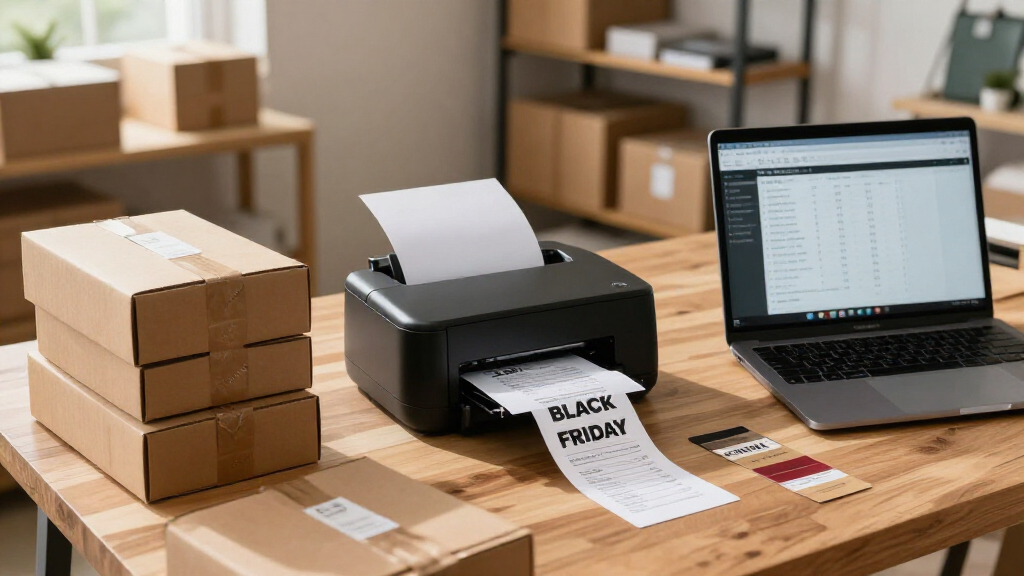
For small businesses comparing Black Friday label printers, I rank the JADENS 168BT as the best overall pick for its wireless setup and built-in label holder. The Phomemo 241BT stands out for buyers who want labels included, while the Arrvel A42BT suits workspaces that benefit from a stand. The main tradeoff is between a simple 4 × 6 shipping-label workflow and features that make a particular desk setup easier to manage. Bluetooth support also needs to match your devices and shipping software, so check compatibility before choosing. Read on for my full breakdown of all 11 options and how I’d match them to different small-business needs.

Get business pricing on office and shipping supplies
- Business-only prices and quantity discounts
- Tax-exempt purchasing
- Multiple users, one account, clear invoices
Key Takeaways
- JADENS 168BT ranks first because its built-in label holder addresses a practical workspace need alongside Bluetooth shipping-label printing.
- Phomemo 241BT includes 20 labels, a useful starter benefit for a new seller, though included media should not be mistaken for a long-term supply.
- Arrvel A42BT adds a stand, giving it a more workspace-focused role than the otherwise similar 4 × 6 Bluetooth options.
- Most picks center on Bluetooth and 4 × 6 labels; the deciding differences are often label handling, included supplies, and fit with your device and shipping workflow.
- RP425-family models are not interchangeable by name alone: compare the Rongta RP425, Rongta small-business model, and TENSPEED RP425A by exact compatibility and included accessories.
| Rongta RP425 Bluetooth Thermal Shipping Label Printer |  | Best for Cross-Device Flexibility | Printer type: Direct thermal | Connectivity: Bluetooth | Compatible systems: Windows 7 and newer, macOS 10.11 and newer, Chrome OS, iOS, Android | VIEW LATEST PRICE | See Our Full Breakdown |
| JADENS 168BT Wireless Thermal Shipping Label Printer with Built-In Label Holder | 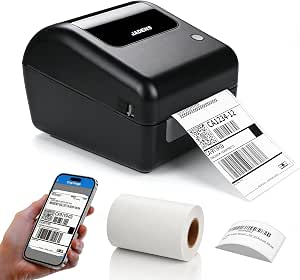 | Best for a Ready-to-Start Shipping Setup | Printer type: Direct thermal | Connectivity: Bluetooth; USB for Mac | Compatible devices: Smartphones, tablets, laptops, PCs | VIEW LATEST PRICE | See Our Full Breakdown |
| labelhive Bluetooth Thermal Shipping Label Printer, Wireless 4×6 |  | Best for Mixed Operating Systems | Printer type: Direct thermal | Resolution: 203 × 203 dpi | Media width: 1.57–4.41 in | VIEW LATEST PRICE | See Our Full Breakdown |
| NADA Print N40 Bluetooth Thermal Shipping Label Printer, 4 × 6 in |  | Best for Template-Led Label Tasks | Printer type: Thermal | Resolution: 203 × 203 dpi | Print speed: Up to 55 4 × 6-inch labels per minute (manufacturer claim) | VIEW LATEST PRICE | See Our Full Breakdown |
| NULLTONEX 4×6 Bluetooth Thermal Shipping Label Printer |  | Best Compact Pick for Faster Shipping Batches | Printer type: Direct thermal | Resolution: 203 DPI | Print speed: Up to 150 mm/s (72 labels per minute) | VIEW LATEST PRICE | See Our Full Breakdown |
| Gloryang 668BT Bluetooth Thermal Shipping Label Printer |  | Best Compact Pick | Printer type: Thermal | Connectivity: Bluetooth | Compatible operating systems: iOS, Android, macOS, Windows | VIEW LATEST PRICE | See Our Full Breakdown |
| Rongta Bluetooth Thermal Shipping Label Printer for Small Business |  | Best for Lightweight Workstations | Printer type: Thermal, inkless | Connectivity: Bluetooth, USB | Resolution: 203 dpi, black and white | VIEW LATEST PRICE | See Our Full Breakdown |
| SVANTTO 4×6 Thermal Shipping Label Printer |  | Best for Flexible Label Media | Printer type: Thermal | Connectivity: Bluetooth 4.0 | Resolution: 203 × 203 dpi | VIEW LATEST PRICE | See Our Full Breakdown |
| TENSPEED RP425A 4×6 Bluetooth Thermal Shipping Label Printer, Black |  | Best for Fast Batch Printing | Printer type: Thermal | Connectivity: Bluetooth, USB, Type-C | Supported operating systems: iOS, Android, Windows XP/7/8/10/11, macOS, Chrome OS | VIEW LATEST PRICE | See Our Full Breakdown |
| Phomemo 241BT Bluetooth Thermal Label Printer with 20 Labels |  | Best Starter Bundle | Printer type: Thermal | Connectivity: Bluetooth, USB | Compatible systems: iOS, Android, Windows, Mac OS, Chrome OS, Linux | VIEW LATEST PRICE | See Our Full Breakdown |
| Arrvel A42BT Bluetooth Thermal Label Printer with Stand |  | Best for Flexible Device Setup | Printer type: Direct thermal | Connectivity: Bluetooth, USB | Print speed: Up to 150 mm/s (72 labels/min) | VIEW LATEST PRICE | See Our Full Breakdown |
| Black Friday label printers for small business | Printer type | Connectivity | Resolution | Print speed |
|---|---|---|---|---|
| Rongta RP425 Bluetooth Thermal | Direct thermal | Bluetooth | 203 dpi | Up to 150 mm/s |
| JADENS 168BT Wireless Thermal | Direct thermal | Bluetooth; USB for Mac | 203 DPI | — |
| labelhive Bluetooth Thermal Sh | Direct thermal | Bluetooth, USB | 203 × 203 dpi | — |
| NADA Print N40 Bluetooth Therm | Thermal | Bluetooth, USB | 203 × 203 dpi | Up to 55 4 × 6-inch labels per minute (manufacturer claim) |
| NULLTONEX 4×6 Bluetooth Therma | Direct thermal | Bluetooth, USB | 203 DPI | Up to 150 mm/s (72 labels per minute) |
| Gloryang 668BT Bluetooth Therm | Thermal | Bluetooth | 203 dpi | — |
| Rongta Bluetooth Thermal Shipp | Thermal, inkless | Bluetooth, USB | 203 dpi, black and white | Up to 15 pages per minute |
| SVANTTO 4×6 Thermal Shipping L | Thermal | Bluetooth 4.0 | 203 × 203 dpi | Up to 180 mm/s |
| TENSPEED RP425A 4×6 Bluetooth | Thermal | Bluetooth, USB, Type-C | 203 dpi | Up to 60 labels per minute (150 mm/s) |
| Phomemo 241BT Bluetooth Therma | Thermal | Bluetooth, USB | 203 × 203 dpi | Up to 150 mm/s |
| Arrvel A42BT Bluetooth Thermal | Direct thermal | Bluetooth, USB | 203 DPI | Up to 150 mm/s (72 labels/min) |
More Details on Our Top Picks
Rongta RP425 Bluetooth Thermal Shipping Label Printer
The Rongta RP425 suits small businesses that want to print shipping labels from a phone or computer without changing printers as devices change. It pairs with iOS and Android through the Rongta app, while drivers support Windows, macOS, and Chrome OS. Its 0.98–4.37-inch label range is wider than the JADENS 168BT’s, which makes the Rongta a more adaptable choice for businesses printing both shipping and narrower identification labels. Automatic label identification can reduce setup fuss when switching media, and the stated speed reaches 150 mm/s. The tradeoff is direct thermal, monochrome output: it needs compatible labels and cannot produce color. Buyers should also verify the printer’s footprint before setting up, since the supplied dimension figures conflict.
Pros:- Bluetooth printing from iOS and Android through the Rongta app
- Supports Windows, macOS, and Chrome OS as well as mobile systems
- Wide 0.98–4.37-inch label-width range
- Automatic label identification and print speeds up to 150 mm/s
Cons:- Monochrome direct-thermal printing requires compatible thermal labels
- Conflicting listed dimensions make it harder to judge desk space needs
Best for: Small-business owners who print from a mix of phones, tablets, and computers and need flexibility across label widths.
Not ideal for: Businesses that need color labels, long-lasting prints on ordinary paper, or a clearly confirmed compact footprint.
- Printer type:Direct thermal
- Connectivity:Bluetooth
- Compatible systems:Windows 7 and newer, macOS 10.11 and newer, Chrome OS, iOS, Android
- Label width:0.98–4.37 in
- Resolution:203 dpi
- Print speed:Up to 150 mm/s
- Print color:Monochrome
- Weight:0.65 kg
- Warranty:1 year
Our verdict“Choose the Rongta RP425 if broad device and label-width support matters more than color printing or certainty about its exact dimensions.”
JADENS 168BT Wireless Thermal Shipping Label Printer with Built-In Label Holder
The JADENS 168BT is a practical pick for a small seller setting up a shipping station and wanting the basic supplies included. Its package comes with 50 4 × 6-inch thermal labels, and the built-in holder helps guide compatible rolls during printing. Like the Rongta RP425, it offers Bluetooth printing from mobile devices and reaches 150 mm/s, but its supported width is narrower at 1.57–4.1 inches. The key compromise is platform-specific connectivity: Mac requires USB, while Bluetooth is listed for phones, tablets, and Windows. That makes it less convenient for a Mac-based team than the labelhive, which lists macOS compatibility. It prints only in monochrome and uses direct-thermal media, so it is aimed at shipping workflows rather than colorful product branding.
Pros:- Includes 50 4 × 6-inch thermal labels to start printing
- Built-in holder guides compatible label rolls
- Bluetooth support for phones, tablets, and Windows devices
- Prints without ink, toner, or ribbons
Cons:- Mac connection requires USB rather than Bluetooth
- Supported label width is narrower than the Rongta RP425’s
- Monochrome direct-thermal output requires compatible labels
Best for: New online sellers who use Windows or mobile devices and want a label holder and starter supply of 4 × 6 labels in the box.
Not ideal for: Mac users who want wireless printing, or businesses that need color output and a broad range of narrow label sizes.
- Printer type:Direct thermal
- Connectivity:Bluetooth; USB for Mac
- Compatible devices:Smartphones, tablets, laptops, PCs
- Label width:1.57–4.1 in
- Resolution:203 DPI
- Maximum print speed:150 mm/s
- Maximum roll capacity:350 sheets
- Included labels:50 4 × 6-inch thermal labels
- Warranty:1 year
Our verdict“Pick the JADENS 168BT for a straightforward Windows or mobile shipping station with labels included, but look elsewhere if wireless Mac printing is a must.”
labelhive Bluetooth Thermal Shipping Label Printer, Wireless 4×6
For a small business with a mixed-device workspace, the labelhive has an unusually broad compatibility list: Windows, macOS, ChromeOS, Linux, iPhone, and Android. That makes it a stronger fit for varied computer setups than the JADENS 168BT, whose Mac connection is USB-only. The labelhive also accepts roll or fanfold media, giving sellers options in how they stock and feed labels. Automatic gap detection, calibration, and jam detection aim to make batch jobs less hands-on. Its 203 dpi resolution is in line with the other printers here, but the supplied details don’t state print speed, so I can’t rank it for throughput against the Rongta RP425 or NULLTONEX. It remains a monochrome, single-tray printer, which limits its appeal for color work or sustained high-volume production.
Pros:- Broad listed compatibility across desktop and mobile operating systems
- Bluetooth and USB connectivity
- Accepts roll and fanfold labels from 1.57 to 4.41 inches wide
- Automatic gap detection, calibration, and jam detection
Cons:- Print speed is not specified in the supplied product data
- Single-tray design may constrain continuous high-volume work
- 203 dpi monochrome printing cannot produce color labels
Best for: Small teams using a mix of Mac, Windows, Linux, ChromeOS, and mobile devices who want both roll and fanfold media support.
Not ideal for: High-volume shippers who need a stated fast print rate, multiple trays, or color labels.
- Printer type:Direct thermal
- Resolution:203 × 203 dpi
- Media width:1.57–4.41 in
- Media formats:Roll or fanfold labels
- Connectivity:Bluetooth, USB
- Operating systems:Windows, macOS, ChromeOS, Linux, iPhone, Android
- Weight:2 lb
- Dimensions:7.2 × 2.4 × 3.15 in
- Warranty:1-year limited warranty
Our verdict“Choose labelhive when operating-system flexibility and roll-or-fanfold feeding matter more than a documented speed or high-volume capacity.”
NADA Print N40 Bluetooth Thermal Shipping Label Printer, 4 × 6 in
The NADA Print N40 is geared toward small businesses that print more than carrier labels: its app offers templates for barcodes and QR codes, along with PDF and TXT import and OCR text recognition. That gives it a different role from the JADENS 168BT, which is presented more as a ready-to-start shipping printer with labels included. The N40 connects by Bluetooth or USB and handles media from 25 to 110 mm wide, including foldable and roll-fed stock. A stated rate of up to 55 4 × 6 labels per minute could suit regular dispatch work, though it is a manufacturer claim rather than a guarantee for every job. It includes only 20 sheets, and its monochrome thermal output is not suited to color branding.
Pros:- App templates support shipping labels, barcodes, and QR codes
- PDF and TXT import plus OCR text recognition
- Bluetooth and USB connections for mobile devices and computers
- Supports foldable and roll-fed media across a 25–110 mm width range
Cons:- Only 20 sheets of labels are included
- Monochrome output cannot support color product branding
- Claimed print rate may vary with label and job conditions
Best for: Small shops that need to print shipping labels alongside barcodes, QR codes, and other template-based business labels.
Not ideal for: Businesses that need color branding, a larger included label supply, or performance figures verified under their own workflow.
- Printer type:Thermal
- Resolution:203 × 203 dpi
- Print speed:Up to 55 4 × 6-inch labels per minute (manufacturer claim)
- Supported paper width:25–110 mm
- Maximum media size:4 × 6 in
- Connectivity:Bluetooth, USB
- Weight:722.5 g
- Included labels:20 sheets, 100 × 150 mm
- Dimensions:18.5 × 9.35 × 9.23 cm
Our verdict“Choose the N40 if templates and varied label tasks matter more than a generous starter supply or color output.”
NULLTONEX 4×6 Bluetooth Thermal Shipping Label Printer
The NULLTONEX combines a compact listed footprint with a specified print speed of up to 150 mm/s, making it a sensible choice for a small packing desk that still handles regular batches. It supports Bluetooth and USB, prints 4 × 6 labels and other sizes from 1.57 to 4.3 inches wide, and includes 25 labels. Compared with the NADA Print N40, its stated speed is expressed in millimeters per second rather than a claimed labels-per-minute figure, so the two rates are not directly comparable. The N40, by contrast, lists more template and text-import tools. NULLTONEX offers customizable app templates and offline storage, but the supplied compatibility details are broad rather than platform-specific. Like the others, it is monochrome and needs thermal labels.
Pros:- Compact listed dimensions and 1.2 lb weight suit a small packing area
- Bluetooth and USB connectivity
- Print speed up to 150 mm/s
- Includes 25 4 × 6 thermal labels and offers customizable templates
Cons:- Monochrome output cannot support color branding
- Requires direct-thermal labels rather than ordinary paper
- Compatible devices are listed broadly without specific operating-system versions
Best for: Small online sellers with limited packing space who want Bluetooth and USB connections plus a stated print speed for routine shipping batches.
Not ideal for: Businesses needing clearly documented support for a specific operating system, color labels, or detailed app workflow features.
- Printer type:Direct thermal
- Resolution:203 DPI
- Print speed:Up to 150 mm/s (72 labels per minute)
- Connectivity:Bluetooth, USB
- Label width:1.57–4.3 in
- Supported label size:4 × 6 in and other sizes
- Weight:1.2 lb
- Dimensions:8.08 × 4.73 × 6.9 in
- Included labels:25 sheets of 4 × 6 thermal labels
Our verdict“Choose NULLTONEX for a compact shipping station with both wireless and USB connections, but not if detailed platform support or color output is essential.”
Gloryang 668BT Bluetooth Thermal Shipping Label Printer
The Gloryang 668BT suits a small shipping station where desk space matters more than extensive workflow features. Its compact footprint and Bluetooth printing let a seller send 4 × 6 shipping labels from a phone or computer without setting aside room for a larger setup. It also accepts narrower labels, which can cover basic barcode or product-label jobs alongside parcels. Like the Phomemo 241BT, it offers wireless mobile printing and inkless operation; the Phomemo, however, supports a slightly wider maximum label size and includes 20 labels. The Gloryang’s main tradeoff is straightforward: 203 dpi monochrome output is for practical shipping and identification, not color branding, and printing is simplex only. Choose it for a tidy, small-volume station, not for a business seeking advanced print options.
Pros:- Compact dimensions help preserve room on a crowded packing desk.
- Bluetooth supports printing from phones, tablets, and computers.
- Accepts 4 × 6 shipping labels as well as narrower labels.
- Thermal printing avoids ink and toner supplies.
Cons:- Monochrome output cannot support color-coded labels or full-color branding.
- Simplex-only printing offers no two-sided output.
- No print-speed figure or platform-specific shipping integration is supplied in the product data.
Best for: Small home-based sellers who need Bluetooth 4 × 6 shipping labels and have limited desk space.
Not ideal for: Businesses that need color labels, double-sided output, or a wider range of media than the listed 1.57–4.1-inch widths.
- Printer type:Thermal
- Connectivity:Bluetooth
- Compatible operating systems:iOS, Android, macOS, Windows
- Supported label width:1.57–4.1 in
- Resolution:203 dpi
- Print output:Monochrome
- Dimensions:8.43 × 6.5 × 5.12 in
- Weight:1.11 kg
Our verdict“Pick the Gloryang 668BT for a compact Bluetooth shipping setup, but choose the Phomemo 241BT if included starter labels and a wider supported label range matter more.”
Rongta Bluetooth Thermal Shipping Label Printer for Small Business
The Rongta RP425A is a sensible fit for a seller who wants both Bluetooth and USB without committing much desk space or carrying weight. At 0.57 kg, it is lighter than the Gloryang 668BT, while USB gives desktop users a wired option when wireless setup is inconvenient. Its 4 × 6-inch media support targets the common parcel-label workflow, and the listed speed of up to 15 pages per minute points to a practical small-business pace. The TENSPEED RP425A claims a higher rate of 60 labels per minute and adds Type-C connectivity, making it the more compelling candidate for frequent batches. Rongta’s appeal is its simpler, lighter setup, not maximum throughput. It remains a monochrome printer, and the supplied data does not specify a label-width range beyond its 4 × 6-inch maximum media size.
Pros:- Bluetooth and USB provide wireless and wired connection options.
- At 0.57 kg, it is lighter than the Gloryang 668BT.
- Inkless thermal printing avoids ink and toner replenishment.
- Lists compatibility with Windows, Mac, iOS, and Android.
Cons:- Monochrome printing rules out color branding and color-coded labels.
- The listed speed is lower than the TENSPEED RP425A’s claimed 60 labels per minute.
- Product data does not provide a supported label-width range.
Best for: Small sellers who want a lightweight printer with Bluetooth for mobile orders and USB for a desktop packing station.
Not ideal for: High-volume shippers focused on fast batch output, or buyers who need confirmed support for label sizes beyond 4 × 6 inches.
- Printer type:Thermal, inkless
- Connectivity:Bluetooth, USB
- Resolution:203 dpi, black and white
- Print speed:Up to 15 pages per minute
- Maximum media size:4 × 6 in
- Supported operating systems:Windows, Mac, iOS, Android
- Weight:0.57 kg
- Warranty:1-year limited
Our verdict“Choose the Rongta RP425A for a lightweight Bluetooth-and-USB setup, but favor the TENSPEED RP425A if batch speed and broader connection options are the priority.”
SVANTTO 4×6 Thermal Shipping Label Printer
The SVANTTO stands out for small businesses that use more than one label format. Alongside standard 4 × 6 shipping labels, it supports fanfold, roll, and black-mark media across a 1.5–4.2-inch width range. That flexibility can reduce the need for a separate printer when a seller also prints narrower inventory or barcode labels. Its stated speed of up to 180 mm/s and 203 dpi resolution are suited to clear monochrome shipping output, while the listed 50 km printhead life gives buyers a concrete durability specification to weigh. By comparison, the Gloryang 668BT also handles multiple widths but does not list the same media types or a printhead-life figure. SVANTTO is less compelling for someone who prints only occasional 4 × 6 labels; its main advantage is media choice, not color or larger-format output.
Pros:- Supports fanfold, roll, and black-mark thermal labels.
- The 1.5–4.2-inch width range covers shipping and narrower label tasks.
- Bluetooth 4.0 supports wireless connections to phones and computers.
- Lists print speed up to 180 mm/s and a 50 km printhead life.
Cons:- Monochrome output cannot produce color branding or color-coded labels.
- Maximum media size is 4 × 6 inches.
- Warranty is listed only as limited, without a duration in the supplied data.
Best for: Small businesses that print parcel labels plus narrower barcode or product labels on different thermal media.
Not ideal for: Sellers who need color output, media wider than 4.2 inches, or only want a basic printer for occasional 4 × 6 labels.
- Printer type:Thermal
- Connectivity:Bluetooth 4.0
- Resolution:203 × 203 dpi
- Print speed:Up to 180 mm/s
- Compatible label width:1.5–4.2 in
- Supported media:Fanfold, roll, and black-mark labels
- Printhead life:50 km
- Dimensions:5 × 7.99 × 4 in
Our verdict“Choose SVANTTO if your small business switches among thermal label formats; for a simpler compact 4 × 6 setup, the Gloryang 668BT may be enough.”
TENSPEED RP425A 4×6 Bluetooth Thermal Shipping Label Printer, Black
For sellers who print labels in batches, the TENSPEED RP425A has the strongest stated throughput in this group: up to 60 labels per minute, or 150 mm/s. Its 0.98–4.37-inch width range also gives it more flexibility than the Rongta RP425A, whose supplied specs list 4 × 6-inch maximum media but no width range. Bluetooth, USB, and Type-C make it easier to fit into different workstations, and the 1.25 lb weight suits businesses that move equipment between packing areas. There is an important compatibility caveat: Apple laptops with Intel chips cannot use Bluetooth, so those users should plan around USB or check their setup before buying. Output is monochrome, and the data does not list supported media types or printhead life. This is the throughput pick, not the safest choice for every Mac workflow.
Pros:- Claims throughput of up to 60 labels per minute.
- Supports Bluetooth, USB, and Type-C connections.
- Accepts label widths from 0.98 to 4.37 inches.
- Lightweight 1.25 lb design is easy to move between work areas.
Cons:- Bluetooth is unavailable with Apple laptops using Intel chips.
- Monochrome output cannot handle color branding or color-coded workflows.
- Supplied product data does not specify supported media types or printhead life.
Best for: Small-business sellers printing frequent label batches who want a lightweight printer with multiple connection options.
Not ideal for: Owners of Intel-based Apple laptops who require Bluetooth, or businesses that need color output and documented media-format support.
- Printer type:Thermal
- Connectivity:Bluetooth, USB, Type-C
- Supported operating systems:iOS, Android, Windows XP/7/8/10/11, macOS, Chrome OS
- Resolution:203 dpi
- Print speed:Up to 60 labels per minute (150 mm/s)
- Label width range:0.98–4.37 in
- Weight:1.25 lb (0.53 kg)
- Power consumption:24 W
Our verdict“Pick the TENSPEED RP425A for fast batches and flexible connections, but Intel Mac owners should plan to print by USB rather than Bluetooth.”
Phomemo 241BT Bluetooth Thermal Label Printer with 20 Labels
The Phomemo 241BT makes a straightforward starting point for a new seller because it includes 20 labels and supports both mobile Bluetooth printing and wired computer use. Its 1–4.6-inch label range is the broadest listed here, edging past the TENSPEED RP425A’s 4.37-inch maximum, while 4 × 6 shipping labels remain supported. For a small operation, direct thermal printing avoids ink and toner, and the 150 mm/s rate is suited to routine order packing rather than heavy-duty batch work. The compromise is a more involved setup across devices: mobile printing requires an app, while computer printing needs a driver. Unlike the SVANTTO, it does not list fanfold, roll, or black-mark media support. It is a practical starter for common shipping tasks, not a specialist choice for varied media or color labels.
Pros:- Includes 20 labels to get a small shipping operation started.
- Bluetooth and USB cover mobile and computer workflows.
- Supports label widths from 1 to 4.6 inches, the broadest range listed among these five.
- Works with iOS, Android, Windows, Mac OS, Chrome OS, and Linux.
Cons:- Mobile printing requires an app, while computer printing requires a driver.
- Monochrome output cannot produce color-branded labels.
- Product data does not list support for fanfold, roll, or black-mark media.
Best for: New online sellers who want a 4 × 6 shipping-label printer with starter labels and options for both mobile and desktop printing.
Not ideal for: Businesses that need color labels, specialized media formats, or app-free mobile printing.
- Printer type:Thermal
- Connectivity:Bluetooth, USB
- Compatible systems:iOS, Android, Windows, Mac OS, Chrome OS, Linux
- Supported label width:1–4.6 in
- Maximum media size:4 × 6 in
- Resolution:203 × 203 dpi
- Print speed:Up to 150 mm/s
- Included labels:20
Our verdict“Choose the Phomemo 241BT for a broad label-width range and a small starter supply, but consider SVANTTO if your workflow depends on multiple media types.”
Arrvel A42BT Bluetooth Thermal Label Printer with Stand
The Arrvel A42BT suits small businesses that switch between phones, tablets, and computers: it offers Bluetooth and USB connections, plus compatibility with iOS, Android, Windows, macOS, ChromeOS, and Linux. Its included stand accommodates roll labels, while the printer also handles fanfold stock from 1.57 to 4.3 inches wide. That range gives it more room for custom label formats than a printer focused mainly on standard 4 × 6 shipping labels, such as the SVANTTO 4×6.
At up to 150 mm/s, it can keep routine shipping batches moving, and the app’s cropping and design tools may help newer sellers prepare labels. The tradeoff is that Bluetooth printing on iOS, Android, and macOS requires the FlashLabel Pro app; USB offers another route, but setup is less direct for some workflows. It also prints monochrome only, so it cannot produce colored branding.
Pros:- Bluetooth and USB connectivity support a broad range of devices and operating systems.
- Accepts roll and fanfold labels across a 1.57–4.3-inch width range.
- Inkless direct thermal printing avoids ink cartridge replacements.
- Package includes a stand, test labels, adapters, cables, and a one-year warranty.
Cons:- Bluetooth printing from iOS, Android, and macOS requires the FlashLabel Pro app.
- Monochrome output cannot reproduce colored logos or label designs.
- 203 DPI resolution may be limiting for very small text or fine graphics.
Best for: Small sellers who print shipping and custom monochrome labels from a mix of phones, tablets, and computers and want an included stand.
Not ideal for: Businesses that need color labels or want to print from Apple and Android devices without relying on a dedicated app.
- Printer type:Direct thermal
- Connectivity:Bluetooth, USB
- Print speed:Up to 150 mm/s (72 labels/min)
- Resolution:203 DPI
- Supported label width:1.57–4.3 in (40–110 mm)
- Maximum media size:4 × 6 in
- Compatible operating systems:iOS, Android, Windows 7 or later, macOS, ChromeOS, Linux
- Dimensions and weight:7.2 × 3.15 × 2.56 in; 13.76 oz
- Warranty:One year
Our verdict“Choose the Arrvel A42BT if your small business needs flexible device connections and varied monochrome label sizes, but skip it if app-dependent Bluetooth setup or color printing is a dealbreaker.”
How We Picked
I ranked these printers around the needs that shape a small-business shipping station: shipping-label format, connection options, setup demands, and how the printer fits a working desk. I also looked at practical distinctions in the listed configurations, such as a built-in holder, a stand, or labels included in the box. Since model names and bundles can vary, buyers should confirm the exact package and device support before ordering.
The top positions go to options with a clear everyday workflow advantage, rather than treating Bluetooth or 4 × 6 printing as a differentiator when several models share them. I placed specialized picks lower when their appeal depends on a specific setup or when the listing provides fewer distinguishing details. That ranking is not a claim that one printer suits every shop: compatibility with your computer or phone, shipping platform, label stock, and daily volume can change which model is the better buy.
| Black Friday label printers for small business | Printer type | Connectivity |
|---|---|---|
| Rongta RP425 Bluetooth Thermal | Direct thermal | Bluetooth |
| JADENS 168BT Wireless Thermal | Direct thermal | Bluetooth; USB for Mac |
| labelhive Bluetooth Thermal Sh | Direct thermal | Bluetooth, USB |
| NADA Print N40 Bluetooth Therm | Thermal | Bluetooth, USB |
| NULLTONEX 4×6 Bluetooth Therma | Direct thermal | Bluetooth, USB |
| Gloryang 668BT Bluetooth Therm | Thermal | Bluetooth |
| Rongta Bluetooth Thermal Shipp | Thermal, inkless | Bluetooth, USB |
| SVANTTO 4×6 Thermal Shipping L | Thermal | Bluetooth 4.0 |
| TENSPEED RP425A 4×6 Bluetooth | Thermal | Bluetooth, USB, Type-C |
| Phomemo 241BT Bluetooth Therma | Thermal | Bluetooth, USB |
| Arrvel A42BT Bluetooth Thermal | Direct thermal | Bluetooth, USB |
Factors to Consider When Choosing Black Friday Label Printers For Small Business
Before choosing a printer, I’d start with the shipping routine it needs to support—not the Black Friday label or the longest feature list. These broader checks can help avoid a printer that technically prints labels but adds friction to daily fulfillment.
Match the Printer to Your Shipping Software and Devices
A Bluetooth label printer is only useful if it pairs with the device and shipping workflow you rely on. Check the printer’s current compatibility information against your computer or mobile operating system, then check whether your carrier or marketplace supports printing to that model. A product title that says Bluetooth does not by itself confirm that every phone, computer, or app will work. If staff print from different devices, decide whether wireless pairing or a consistent computer-based process will be easier to manage. A little compatibility research before checkout can save more time than a convenient wireless connection saves later.
Choose Label Size Around Your Actual Orders
Many options in this roundup are built around 4 × 6 shipping labels, a common format for parcel fulfillment. Before buying, check the label dimensions your shipping platform generates and whether your orders ever need smaller address, product, or barcode labels. A printer that handles your main parcel label may not replace every labeling tool in a mixed-product business. Avoid assuming that thermal printing means every roll or fanfold label will feed correctly; confirm supported media dimensions and loading method. If you ship several package types, test the workflow on a small batch before committing to bulk label supplies.
Plan for Label Storage and Desk Space
The printer itself is only part of the footprint: rolls or fanfold stacks also need space and a clean feed path. A built-in holder or separate stand can make a busy packing table neater, but it may be unnecessary if labels already sit beside the printer. Measure the area around your packing station, including room to open the printer and replace media. Keep the label path away from loose packing material, which can interfere with feeding. For a shared or compact desk, a tidy setup may matter more day to day than a feature that rarely gets used.
Estimate Volume Before Paying for Convenience
Daily label volume affects how much setup time and media handling matter. A seller printing a few parcels a week may prefer a straightforward, compact arrangement, while a busier shop may value a holder or stand that keeps replenishment organized. Do not infer commercial capacity from the phrase “small business” in a listing; check the manufacturer’s guidance for supported use and maintenance. Also account for who will load labels and resolve jams when orders are moving quickly. Paying for a more elaborate setup makes sense only when it removes a recurring bottleneck.
Compare the Whole Supply Workflow, Not Just the Printer
Thermal printing avoids ink cartridges, but it still depends on compatible labels and a printer kept clean and correctly loaded. Confirm media type, width, and sourcing before you settle on a model, especially if you plan to buy labels in bulk. An included starter pack, such as the labels listed with the Phomemo 241BT, can help you begin printing but does not establish the cost or availability of future supplies. Check what is actually in the box rather than assuming that a holder, stand, or label roll is included. A dependable supply path can matter more than a small accessory advantage.
Treat Black Friday as a Time to Verify the Exact Bundle
Seasonal listings can make closely named models and packages easy to confuse. Compare the complete model number, included accessories, supported devices, and label bundle rather than choosing from a short headline. This is especially useful when a product name shares a series number with another printer, as the Rongta RP425 and TENSPEED RP425A do. Read the current listing and manufacturer details, since bundles and specifications can change. A strong purchase is the configuration that fits your workflow, not simply the one presented as a seasonal deal.
Frequently Asked Questions
Can I print shipping labels from my phone with these Bluetooth models?
Bluetooth in the product name signals wireless capability, but it does not guarantee compatibility with every phone, operating system, or shipping app. Check the exact model’s supported devices and the app or driver requirements before buying. If your shipping platform only supports printing through a computer, a phone connection may not help your workflow. For a business with multiple users, confirm whether each device can pair and print reliably under the maker’s instructions. Choose based on the full device-to-platform path, not Bluetooth alone.
Are these printers a good fit if I print only a few orders each week?
They can be, particularly if you regularly print 4 × 6 parcel labels and want a dedicated thermal printer rather than using a full-size office printer. For very occasional shipping, setup and media storage may outweigh the convenience, so compare the printer with your existing process before buying. A model with labels included can lower the effort of getting started, but you will still need to source compatible supplies later. Also check that your shipping service supports the printer and label format. Your order frequency and available desk space matter more than the business label in the product title.
Do I need a built-in label holder or a printer stand?
Neither accessory is necessary for every shop; their value depends on how labels are stored and fed at your packing station. A built-in holder, like the one listed with the JADENS 168BT, may reduce clutter if you use rolls that suit its setup. The Arrvel A42BT’s listed stand may appeal when elevating or organizing the printer helps your workspace. If you already have a stable surface and a separate media holder, those extras may add little. Confirm which accessories come with the exact package before relying on them.
Does a thermal printer require special labels, and what should I check before stocking up?
Thermal printers use compatible label media rather than standard inkjet or laser sheets, but the exact type and dimensions still matter. Check the model’s supported label width, feed style, and any guidance on roll or fanfold stock. Then confirm that your shipping software creates labels in a format the printer can handle. Avoid placing a large supply order until you know the selected printer feeds that media correctly. Starting with a small quantity can reduce waste if the size or loading method does not suit your workflow.
How should I choose between the Rongta RP425, the Rongta small-business model, and the TENSPEED RP425A?
Do not assume that similar names mean identical hardware, included accessories, or software support. Compare each listing’s complete model number, connection details, operating-system support, media specifications, and what comes in the box. The TENSPEED listing identifies an RP425A, while the other two listings use different descriptions, so verify the exact manufacturer and model information. If your shop depends on a particular device or platform, prioritize confirmed compatibility over a familiar series name. When details remain unclear, contact the seller or manufacturer before purchase.
Conclusion
My best overall choice is the JADENS 168BT for a small shipping station that can use its built-in holder. For best value in practical setup, I’d look at the Phomemo 241BT if its included 20 labels are useful for getting started, while remembering that ongoing media needs remain. The best premium-style workspace pick is the Arrvel A42BT for buyers who specifically want a stand, not for anyone seeking unlisted performance claims. For beginners, the Phomemo’s included labels make the first setup more approachable, provided device and app compatibility check out. If your specific need is a more organized label feed, compare the JADENS holder and Arrvel stand; if you need a particular computer or phone workflow, choose only after confirming exact model support. That fit matters more than a Black Friday label on the listing.
Black Friday Picks

Vari Pro Plus 36 Standing Desk Converter, Black
As an affiliate, we earn on qualifying purchases.